
7.1 Motion Control Section
7.1 Motion Control Section
7.1.1 Overall Introduction
The A3 robot comes pre-installed with a motion control program. Users only need to send high-level commands to directly control the robot’s movement, without needing to develop low-level control models for functions such as walking.
The Zhiyuan Yunkong program features an internal state machine that switches between different models depending on the current state. The state machine is illustrated in the figure below:
The descriptions for each status are as follows:
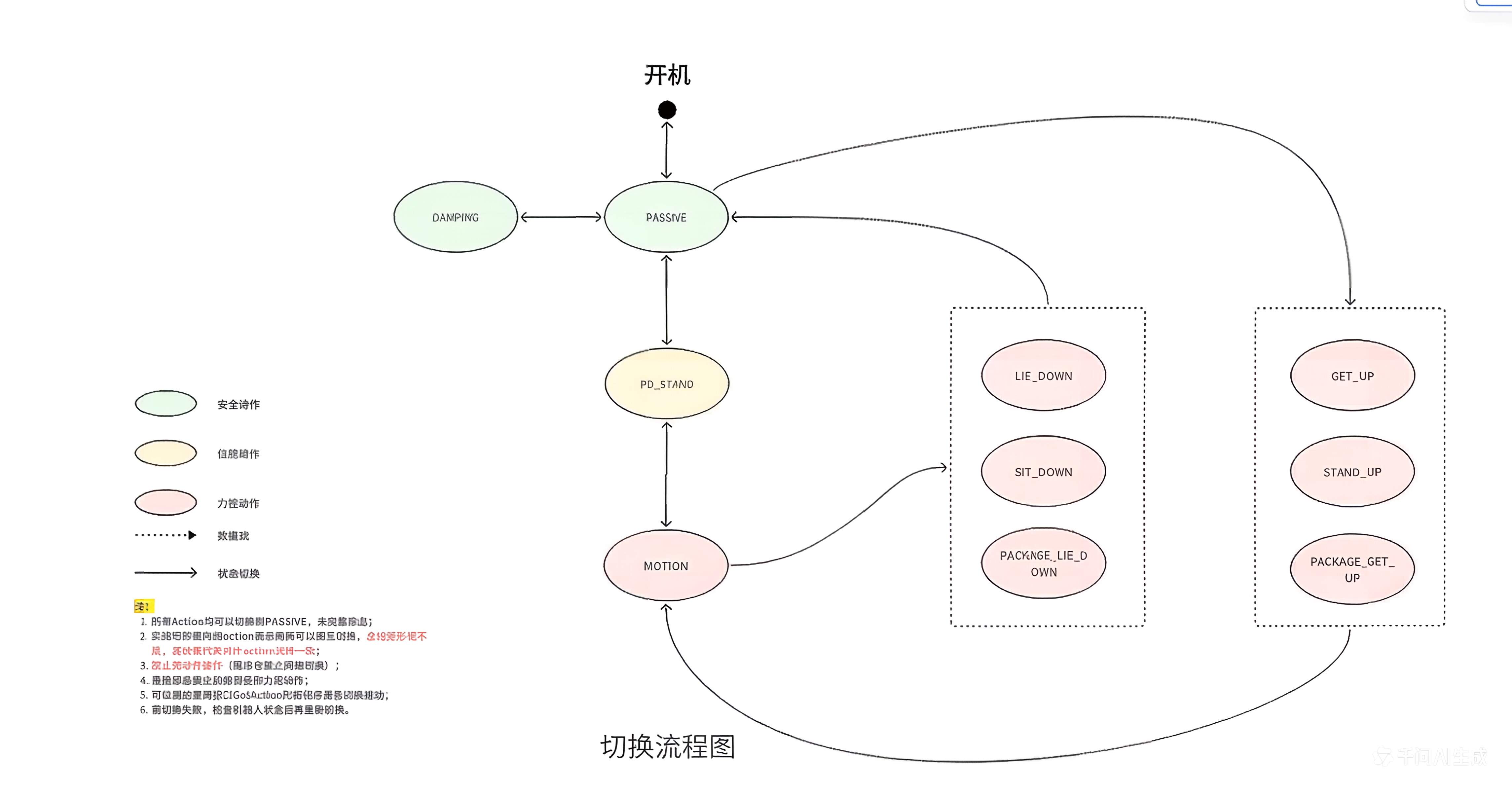
The descriptions for each state are as follows:
| Action Type | Action Code | Chinese Name | Detailed Description | Available Control Interfaces |
|---|---|---|---|---|
| Safe Action | PASSIVE | Default Mode | The default action after motion control starts | |
| Safe Action | DAMPING | Damping Mode | Joints can still move, but with high damping, can be fixed | |
| Position Control Action | PD_STAND | Position Control Stand Mode | The robot stands in position control; joint initialization before entering force control mode | |
| Force Control Action | MOTION | Motion Mode | In this mode, the robot can walk, perform upper limb movements, dance, etc. |
|
| Force Control Action | SIT_DOWN | Sit Down Mode | Used together with STAND_UP mode | |
| Force Control Action | STAND_UP | Stand Up Mode | Used together with SIT_DOWN mode | |
| Force Control Action | LIE_DOWN | Lie Down Mode | Used together with GET_UP mode | |
| Force Control Action | GET_UP | Get Up Mode | Used together with LIE_DOWN mode | |
| Force Control Action | PACKAGE_LIE_DOWN | Package Lie Down Mode | Used together with PACKAGE_GET_UP mode | |
| Force Control Action | PACKAGE_GET_UP | Package Get Up Mode | Used together with PACKAGE_LIE_DOWN mode |
In general, it is not recommended to use the program to switch between non-force control states. Only switching between force control states is recommended programmatically. Other switches, such as lifting or placing the robot, should only be performed manually.
Control interfaces usually have Action requirements. Interfaces without specified Action requirements and query interfaces generally have no Action restrictions.
7.1.2 State Machine Switching and Query RPC Interfaces
| Interface Name | pb:/aimdk.protocol.MotionControlActionService/SetAction |
|---|---|
| Function Overview | Switch motion control state machine |
| Interface Type | HTTP JSON RPC |
| URL | http://10.42.10.12:56322/rpc/aimdk.protocol.MotionControlActionService/SetAction |
| Input Parameters | text
|
| Output Parameters | text
|
| Example Script | examples/mc/S_SetAction.py |
| Remarks |
|
| Interface Name | pb:/aimdk.protocol.MotionControlActionService/GetAction |
|---|---|
| Function Overview | Query motion control state machine |
| Interface Type | HTTP JSON RPC |
| URL | http://10.42.10.12:56322/rpc/aimdk.protocol.MotionControlActionService/GetAction |
| Input Parameters | text |
| Output Parameters | text
|
| Example Script | example/mc/S_GetAction.py |
| Remarks |
|
7.1.3 Robot Available Actions Query RPC Interface
| Interface Name | pb:/aimdk.protocol.MotionControlActionService/GetAvailableActions |
|---|---|
| Function Overview | Get available actions |
| Interface Type | HTTP JSON RPC |
| URL | http://10.42.10.12:56322/rpc/aimdk.protocol.MotionControlActionService/GetAvailableActions |
| Input Parameters | text |
| Output Parameters | text
|
| Example Script | examples/mc/S_SetAction.py |
| Remarks | Usually, the current switchable action state is queried through the GetAvailableActions interface, and then the action state is set through the SetAction interface. |
7.1.4 Locomotion Control Command Topic Interface
| Interface Name | /motion/control/locomotion_velocity |
|---|---|
| Function Overview | Locomotion control command |
| Interface Type | ROS2 Topic |
| Input Parameters | text
|
| Example Script | examples/mc/walk.py |
| Remarks |
|
7.1.5 Arm Control Command and State Topic Interfaces
| Interface Name | /motion/control/arm_joint_command |
|---|---|
| Function Overview | Arm joint control command |
| Interface Type | ROS2 Topic |
| Input Parameters | sensor_msgs::msg::JointState
|
| Example Script | examples/mc/arm.py |
| Remarks |
|
| Interface Name | /motion/control/arm_joint_state |
|---|---|
| Function Overview | Arm joint state topic |
| Interface Type | ROS2 Topic |
| Output Parameters | sensor_msgs::msg::JointState
|
| Example Script | examples/mc/joint_state.py |
| Remarks | This interface has no Action restrictions. |