
5. Secondary Development Program Deployment
5. Secondary Development Program Deployment
Two deployment methods are generally recommended for secondary development programs: onboard HDU/ADU deployment and third-party industrial PC deployment. Onboard deployment is simpler in terms of hardware and is suitable when the secondary development program does not consume many resources. If more resources are required, some existing programs on the HDU or ADU need to be stopped to free CPU, GPU, and other resources. Third-party industrial PC deployment requires additional data transmission methods such as HTTP, but it allows the original onboard software functions to be retained while also providing relatively sufficient computing resources.
5.1 Onboard HDU and ADU Deployment
The recommended deployment directory is /agibot/data/home/agi/Desktop. The onboard disk cleanup module clears space periodically, but this directory is on the whitelist and will not be cleaned.
mkdir -p /agibot/data/home/agi/Desktop
If you encounter permission issues, you can create the directory with the following commands:
sudo mkdir -p /agibot/data/home/agi/Desktop
sudo chown -R agi:agi /agibot/data/home/agi
5.1.1 Python Virtual Environment
If you use Python for secondary development, you only need to create a virtual environment. Tools such as conda or venv can be used. venv is built into the system. For Conda installation, refer to the official Miniconda installation guide.
5.1.2 Docker Deployment
If you use C++ or another compiled language, or if you need to install or modify certain system dependencies, you can consider deploying with Docker.
For Docker installation, refer to https://docs.docker.com/engine/install/ubuntu/#install-from-a-package. Do not install Docker with apt.
5.1.2.1 Change the Default Docker Data Path
The default Docker data path, /var/lib/docker, is on a relatively small partition. You need to change the default data storage path to a whitelisted directory.
- Move the default storage pathbash
# Stop the Docker service sudo systemctl stop docker # Move the default storage path (create the target path /agibot/data/home/agi/Desktop first) sudo mv /var/lib/docker /agibot/data/home/agi/Desktop - Modify the configuration filebash
# Edit the Docker configuration
sudo vim /etc/docker/daemon.json
Add the following content to the configuration file:json{ "data-root": "/agibot/data/home/agi/Desktop/docker" } - Restart Docker:bash
sudo systemctl start docker
Docker configuration is now complete.
5.1.2.2 ROS2 Communication Between the Container and the Host
With the default configuration, ROS2 communication between the container and the onboard system does not work properly, so additional configuration is required. The HDU is used as the example below, and the same applies to the ADU.
- When creating the container, share IPC and network communication with the host by adding the following options:bash
--ipc=host --net=host - Use the same
agiuser inside the container as on the ORIN, with bothuidandgidset to1001:bashgroupadd -g 1001 agi && useradd -u 1001 -g 1001 -m -s /bin/bash agi - Use the same DDS configuration file inside and outside the container. Copy
/agibot/software/v0/entry/cfg/ros_dds_configuration.xmlfrom the HDU into the container, and run the following commands before executing a ROS2 program or usingros2commands inside the container. Replace/path/towith the actual path:bashexport ROS_DOMAIN_ID=232 export FASTRTPS_DEFAULT_PROFILES_FILE=/path/to/ros_dds_configuration.xml - You should now be able to receive ROS2 topics published by the HDU inside the container:bash
ros2 topic list
5.2 Wired Connection to the Robot Device
Regular Peripheral Connection
There is a Type-C interface on the robot head connected to the HDU device for communication with the HDU. Users can connect the Type-C interface on the robot head to other devices to communicate with the HDU.
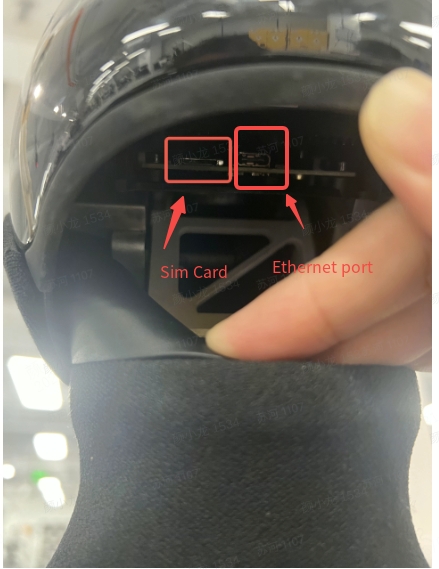
Third-Party Industrial PC Connection
If you need to perform ROS2 communication while connecting to the robot through a wired connection, follow the steps below:
First, connect the third-party industrial PC to the Ethernet port in the robot's rear debugging compartment, and set the PC network segment to 10.42.10.x. Then copy /agibot/software/v0/entry/cfg/ros_dds_configuration.xml from the HDU to the local computer. Before running any ROS2 program or using ros2 commands on the local computer, execute the following commands (/path/to should be replaced with the actual path):
export ROS_DOMAIN_ID=232
export FASTRTPS_DEFAULT_PROFILES_FILE=/path/to/ros_dds_configuration.xml