
8. Interactive Secondary Development Guide
8. Interactive Secondary Development Guide
There are two development modes for interaction-related secondary development on the device side:
- LinkSoul Secondary Development
- AgiBot interaction capabilities are retained. AgiBot provides interfaces across the interaction chain, including TTS, LLM, and ASR. Developers can choose different interfaces as needed to implement more complex interaction-related secondary development.
- Full takeover by secondary development
- AgiBot interaction capabilities are disabled. AgiBot only provides robot microphone input after onboard noise reduction, and the entire voice interaction flow is fully taken over by the secondary development program.
When there are no special requirements, such as an intranet-only environment, custom interaction requirements, or local deployment, LinkSoul secondary development is recommended first. It can effectively reduce development costs and improve development efficiency.
8.1 LinkSoul Secondary Development
Relevant information is available from the LinkSoul Platform Documentation Center. If you encounter issues related to LinkSoul secondary development, you can submit a ticket through the following channel: https://agirobot.feishu.cn/share/base/form/shrcn89PyePk9S7HvJKOmvYqUUb
Workflow
Step 1: Log in to the Developer Console, create an application, and enable the AgentSDK capability.
Important: Save the APP Secret immediately after creation. This information is visible only once when the application is first created and cannot be retrieved later.
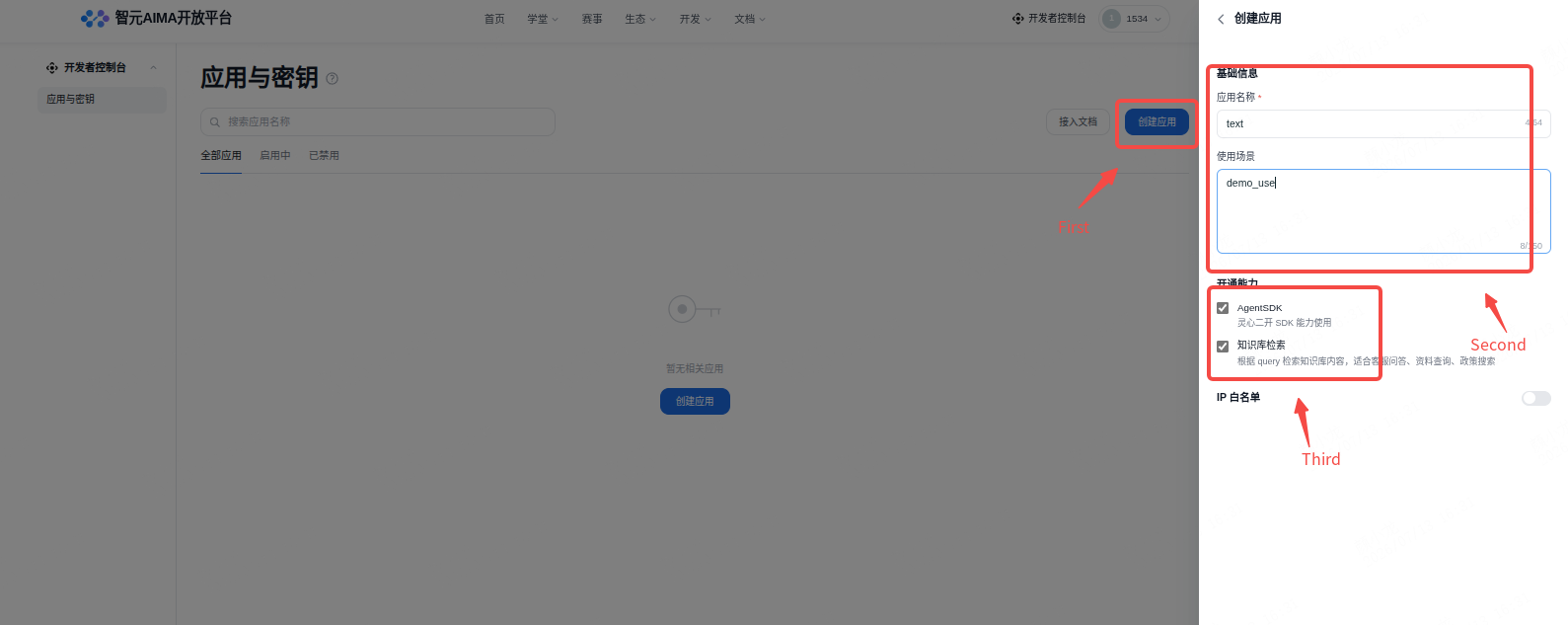
Step 2: Create an SDK template.
Log in to the LinkSoul Platform. In Agent Center -> Agent Templates, choose SDK Access, fill in the template information, and select the corresponding application (API Key).
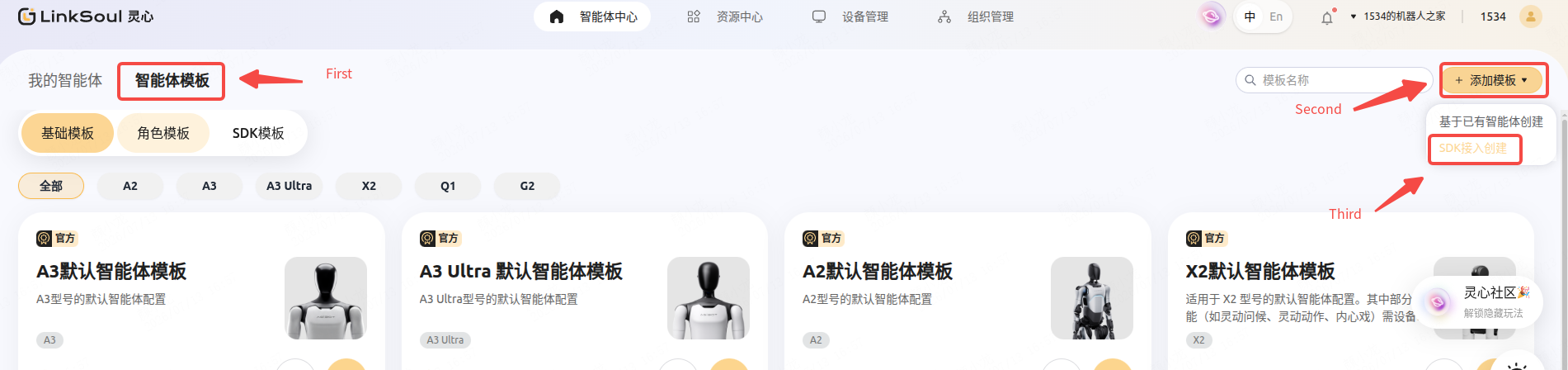
Step 3: Create an SDK agent.
Create an agent based on the SDK template and complete the configuration according to your business needs. The supported configuration items include:
| Field | Description |
|---|---|
| Agent name | - |
| Agent description | - |
| Robot name | Defines the robot name and can be used as a default input parameter. |
| Device wake word | Defines the robot wake word and can be used as a default input parameter. |
| Hotword management | Supports forcibly recognizing a specific word or pronunciation and mapping it to a target word to optimize ASR recognition results for certain keywords. |
| Device usage city | Defines the city where the device is used and can be passed in as a default parameter. |
| Input format | Selects the input format. Raw audio and ASR recognition results are supported. |
| Image input | Selects whether to enable transmission of the interaction video stream. |
| Voice | When disabled, the device directly plays the audio content returned by the SDK. When enabled and a voice is selected, the device uses the configured voice to read out the text content returned by the SDK. |
| Skill invocation mode |
|
| User information recognition |
|
| Knowledge base | After selecting a knowledge base, you can call the knowledge base retrieval API in custom Agent code. The retrievable scope of the agent code is limited to the knowledge bases selected for the current agent. API documentation |
SDK connection and debugging
Developers can refer to the SDK documentation to complete service development and establish the connection with the robot.
Step 4: SDK connectivity and debugging.
After the SDK connection is established successfully, click Test Connectivity on the agent editing page to verify the connection status.
You can then enter the Dialogue Debugging page to debug SDK input and output effects through real voice interaction and quickly verify business logic.
8.2 Full Takeover by Secondary Development
Interactive secondary development in this mode involves three parts: disabling AgiBot interaction capabilities, obtaining microphone audio, and using the speaker. The following sections describe these three parts.
8.2.1 Disable AgiBot Interaction Capabilities
In this mode, the AgiBot interaction program must exit the interaction chain, only output microphone audio after onboard noise reduction and face recognition results, and release control of the speaker. Two operations are required:
- Set the
agentmodule toonly_voiceorvoice_facemode by using theSetAgentPropertiesRequestinterface in the microphone management section.
only_voice: only outputs noise-reduced microphone audio from/agent/process_audio_output, and all downstream links are disconnected.voice_face: outputs noise-reduced microphone audio from/agent/process_audio_outputand face recognition results from/agent/vision/face_id, and all downstream links are disconnected.
For example, the following RPC sets the mode toonly_voice:bashcurl -i \ -H 'content-type:application/json' \ -X POST 'http://10.42.10.10:59301/rpc/aimdk.protocol.AgentControlService/SetAgentPropertiesRequest' \ -d '{ "contents": { "properties": { "2": "only_voice" } } }'
The change takes effect only after the robot is restarted. You can wait until the second modification is complete and restart once at the end. After the restart, you can use theGetAgentPropertiesRequestinterface in the microphone management section to query the current interaction mode and verify whether the change succeeded. To restore the original mode, change"only_voice"or"voice_face"in theSetAgentPropertiesRequestinterface back to"normal".
8.2.2 Obtain Microphone Audio
Note: To obtain the following audio, the robot must remain online for at least 2 minutes after boot so that audio-related authentication can complete. Otherwise, no raw audio will be output. If offline use is required, first make sure this interface has audio output and then disconnect the network.
After exiting the interaction chain, you can use the noise-reduced microphone audio Topic interface /agent/process_audio_output to obtain microphone audio after onboard noise reduction. An example program for obtaining onboard noise-reduced microphone audio is shown below:
#!/usr/bin/env python3

import rclpy
from rclpy.node import Node
from rclpy.qos import QoSHistoryPolicy, QoSProfile, QoSReliabilityPolicy
from ros2_plugin_proto.msg import RosMsgWrapper

from aimdk.protocol_pb2 import ProcessedAudioOutput, AudioVADState

import datetime
import os

class AudioSubscriber(Node):
    def __init__(self):
        super().__init__("audio_subscriber")

        # Audio buffers, stored separately by stream_id
        self.audio_buffers = {}  # {stream_id: bytearray()}
        self.recording_state = {}  # {stream_id: bool}, whether recording is active

        # Create the output directory for audio files
        self.audio_output_dir = "audio_recordings"
        os.makedirs(self.audio_output_dir, exist_ok=True)

        qos_profile = QoSProfile(
            history=QoSHistoryPolicy.KEEP_LAST,
            depth=10,
            reliability=QoSReliabilityPolicy.BEST_EFFORT,
        )

        self.subscription = self.create_subscription(
            RosMsgWrapper,
            "/agent/process_audio_output/pb_3Aaimdk_2Eprotocol_2EProcessedAudioOutput",
            self.audio_callback,
            qos_profile,
        )

        self.get_logger().info("Started subscribing to noise-reduced audio data...")

    def audio_callback(self, msg):
        try:
            # Check whether the serialization type is pb
            if msg.serialization_type != "pb":
                self.get_logger().warn(f"Unsupported serialization type: {msg.serialization_type}")
                return

            # Convert the data field from list[bytes] to bytes
            audio_data_bytes = b"".join(msg.data)

            # Parse the message using the generated protobuf class
            processed_audio = ProcessedAudioOutput()
            processed_audio.ParseFromString(audio_data_bytes)

            self.get_logger().info(
                f"Received audio data: stream_id={processed_audio.stream_id}, "
                f"vad_state={processed_audio.vad_state}, "
                f"audio_size={len(processed_audio.audio_data)} bytes"
            )

            # Process audio according to the VAD state
            self.handle_vad_state(processed_audio)

        except Exception as e:
            self.get_logger().error(f"Error while processing audio message: {e}")

    def handle_vad_state(self, processed_audio):
        """Handle different VAD states."""
        vad_state = processed_audio.vad_state
        stream_id = processed_audio.stream_id
        audio_data = processed_audio.audio_data

        # Initialize the buffer for this stream_id if it does not exist
        if stream_id not in self.audio_buffers:
            self.audio_buffers[stream_id] = bytearray()
            self.recording_state[stream_id] = False

        # Mapping of VAD state names
        vad_state_names = {
            AudioVADState.AUDIO_VAD_STATE_NONE: "No speech",
            AudioVADState.AUDIO_VAD_STATE_BEGIN: "Speech begin",
            AudioVADState.AUDIO_VAD_STATE_PROCESSING: "Speech processing",
            AudioVADState.AUDIO_VAD_STATE_END: "Speech end",
        }

        stream_names = {1: "Internal microphone", 2: "External microphone"}

        self.get_logger().info(
            f"[{stream_names.get(stream_id, f'Unknown stream {stream_id}')}] "
            f"VAD state: {vad_state_names.get(vad_state, f'Unknown state {vad_state}')} "
            f"audio data: {len(audio_data)} bytes"
        )

        # Process audio data according to the VAD state
        if vad_state == AudioVADState.AUDIO_VAD_STATE_BEGIN:
            self.get_logger().info("Speech start detected")
            # Start a new recording and clear the buffer
            self.audio_buffers[stream_id].clear()
            self.recording_state[stream_id] = True
            # Append the current audio data
            if len(audio_data) > 0:
                self.audio_buffers[stream_id].extend(audio_data)

        elif vad_state == AudioVADState.AUDIO_VAD_STATE_PROCESSING:
            self.get_logger().info("Speech is being processed...")
            # If recording is active, continue appending audio data
            if self.recording_state[stream_id] and len(audio_data) > 0:
                self.audio_buffers[stream_id].extend(audio_data)

        elif vad_state == AudioVADState.AUDIO_VAD_STATE_END:
            self.get_logger().info("Speech ended")
            # Append the final chunk of audio data
            if self.recording_state[stream_id] and len(audio_data) > 0:
                self.audio_buffers[stream_id].extend(audio_data)

            # Save the complete audio segment
            if (
                self.recording_state[stream_id]
                and len(self.audio_buffers[stream_id]) > 0
            ):
                self.save_audio_segment(bytes(self.audio_buffers[stream_id]), stream_id)

            # Stop recording
            self.recording_state[stream_id] = False

        elif vad_state == AudioVADState.AUDIO_VAD_STATE_NONE:
            # No speech state, do not record
            if self.recording_state[stream_id]:
                self.get_logger().info("Recording state reset")
                self.recording_state[stream_id] = False

        # Output the current buffer status
        if stream_id in self.audio_buffers:
            buffer_size = len(self.audio_buffers[stream_id])
            recording = self.recording_state[stream_id]
            self.get_logger().debug(
                f"[Stream {stream_id}] Buffer size: {buffer_size} bytes, recording: {recording}"
            )

    def save_audio_segment(self, audio_data, stream_id):
        """Save the audio segment as 16 kHz, 16-bit, mono PCM."""
        if len(audio_data) > 0:
            timestamp = datetime.datetime.now().strftime("%Y%m%d_%H%M%S_%f")

            # Create a subdirectory by stream_id
            stream_dir = os.path.join(self.audio_output_dir, f"stream_{stream_id}")
            os.makedirs(stream_dir, exist_ok=True)

            # Generate the file name
            stream_names = {1: "internal_mic", 2: "external_mic"}
            stream_name = stream_names.get(stream_id, f"stream_{stream_id}")
            filename = f"{stream_name}_{timestamp}.pcm"
            filepath = os.path.join(stream_dir, filename)

            try:
                with open(filepath, "wb") as f:
                    f.write(audio_data)
                self.get_logger().info(
                    f"Audio segment saved: {filepath} (size: {len(audio_data)} bytes)"
                )

                # Calculate the audio duration (assuming 16 kHz, 16-bit, mono)
                sample_rate = 16000
                bits_per_sample = 16
                channels = 1
                bytes_per_sample = bits_per_sample // 8
                total_samples = len(audio_data) // (bytes_per_sample * channels)
                duration_seconds = total_samples / sample_rate

                self.get_logger().info(
                    f"Audio duration: {duration_seconds:.2f} s ({total_samples} samples)"
                )

            except Exception as e:
                self.get_logger().error(f"Failed to save audio file: {e}")

    def get_buffer_info(self):
        """Get information about all buffers for debugging."""
        info = {}
        for stream_id in self.audio_buffers:
            info[stream_id] = {
                "buffer_size": len(self.audio_buffers[stream_id]),
                "recording": self.recording_state[stream_id],
            }
        return info

def main(args=None):
    rclpy.init(args=args)

    audio_subscriber = AudioSubscriber()

    try:
        audio_subscriber.get_logger().info("Listening for noise-reduced audio data. Press Ctrl+C to exit...")
        rclpy.spin(audio_subscriber)
    except KeyboardInterrupt:
        audio_subscriber.get_logger().info("Exit signal received, shutting down...")
    finally:
        audio_subscriber.destroy_node()
        rclpy.shutdown()

if __name__ == "__main__":
    main()
The above program depends on the Python protocol package a3_aimdk and the ROS2 protocol package ros2_plugin_proto. These packages are already included in the prebuilt directory of the AimDK development package. Install the Python package with pip install prebuilt/a3_aimdk-3.0.0-py3-none-any.whl, and use the ROS2 package after running source prebuilt/ros2_plugin_proto_aarch64/share/ros2_plugin_proto/local_setup.bash.
Note that the above program receives ROS2 messages, so the following environment variables must be set:
source /agibot/software/v0/entry/env/env.sh
The audio data uses a 16 kHz sample rate and 16-bit mono PCM format in little-endian order. The output audio is clean human speech that has already been processed with noise reduction and echo cancellation, and it can be used directly for ASR.
The ProcessedAudioOutput message contains the following fields:
| Field Name | Type | Description |
|---|---|---|
| header | Header | Common message header containing the timestamp and message ID |
| stream_id | uint32 | Audio stream ID (1: internal microphone, 2: external microphone) |
| vad_state | AudioVADState | Voice activity detection state |
| audio_data | bytes | Noise-reduced PCM audio data |
Definition of the AudioVADState enum:
| Enum Value | Numeric Value | Description |
|---|---|---|
| AUDIO_VAD_STATE_NONE | 0 | No speech |
| AUDIO_VAD_STATE_BEGIN | 1 | Speech begin |
| AUDIO_VAD_STATE_PROCESSING | 2 | Speech processing |
| AUDIO_VAD_STATE_END | 3 | Speech end |
Note: In the current version, the vad_state output of the external microphone interface is incorrect. For one voice input, the expected state sequence is 122222222223, but the actual output is 0111111111112. This issue occurs only for the external microphone scenario; the internal microphone works normally. It is planned to be fixed in a future version. For the current version, it is recommended to manually apply a +1 compensation to the state.
8.2.3 Speaker Audio Playback
To use the speaker, you must first acquire audio focus:
ros2 service call /audio_5Fmsgs/srv/RequestAudioFocus audio_msgs/srv/RequestAudioFocus "{focus_requester: {pkg_name: audio_examples_sender, priority: 6, priority_weight: 1}}"
pkg_name is the ROS package name, which means the audio must ultimately be sent from within a ROS package project. priority can be fixed to 6, and priority_weight is the audio weight, which can be set to any value from 1 to 100.
After audio focus is acquired, the PCM stream returned by your own TTS can be played through the audio streaming playback interface. The following is an example of speaker streaming audio playback, which needs to be packaged as a ros_pkg.
#!/usr/bin/env python3

import rclpy
from rclpy.node import Node
from builtin_interfaces.msg import Time as TimeMsg
from audio_msgs.msg import AudioPlayback,AudioInfo,AudioData  # Make sure audio messages can be imported

class AudioPlaybackPublisher(Node):
    def __init__(self):
        super().__init__('audio_playback_publisher')
        self.pub = self.create_publisher(AudioPlayback, '/audiohal/audio/playback', 10)
        self.timer = self.create_timer(1.0, self.timer_callback)  # Send once per second

    def timer_callback(self):
        msg = AudioPlayback()

        # Fill in the timestamp (the field name in attachments is stamps)
        now = self.get_clock().now().to_msg()
        # Compatibility: prefer stamps, otherwise try stamp
        if hasattr(msg, 'stamps'):
            msg.stamps = now
        elif hasattr(msg, 'stamp'):
            msg.stamp = now

        # Fill in info (AudioInfo)
        info = AudioInfo()
        info.channels = 1          # Mono
        info.sample_rate = 16000   # 16 kHz
        info.sample_format = 'S16LE'
        info.coding_format = 'pcm'
        msg.info = info

        # Fill in data (AudioData), example raw bytes
        sample_bytes = b'\x00\x01\x02\x03\x04\x05\x06\x07'  # Example data
        msg.data = AudioData(data=list(sample_bytes))

        msg.pkg_name = 'audio_examples_sender'
        msg.token_id = 'token-0001'

        self.pub.publish(msg)
        self.get_logger().info(
            f'Published AudioPlayback pkg={msg.pkg_name} token={msg.token_id} '
            f'data_len={len(msg.data.data)} sample_rate={msg.info.sample_rate}'
        )


def main(args=None):
    rclpy.init(args=args)
    node = AudioPlaybackPublisher()
    try:
        rclpy.spin(node)
    except KeyboardInterrupt:
        pass
    finally:
        node.destroy_node()
        rclpy.shutdown()


if __name__ == '__main__':
    main()
The above program is provided in the agent directory of the AimDK development package. It depends on the Python protocol package a3_aimdk and the ROS2 protocol package ros2_plugin_proto. These packages are already placed in the prebuilt directory of the AimDK development package. Install the Python package with pip install prebuilt/a3_aimdk-3.0.0-py3-none-any.whl, and use the ROS2 package after running source prebuilt/audio_msgs_proto_aarch64/share/audio_msgs/local_setup.bash.
8.2.4 Wake-Up Result Reporting
If agent is set to only_voice mode, AgiBot also provides wake-up result reporting. The Topic interface is /agent/wakeup/pb_3Aaimdk_2Eprotocol_2EWakeUpResult.
An example program for obtaining wake-up result reports is shown below:
#!/usr/bin/env python3

import rclpy
from rclpy.node import Node
from rclpy.qos import (
    QoSDurabilityPolicy,
    QoSHistoryPolicy,
    QoSProfile,
    QoSReliabilityPolicy,
)
from ros2_plugin_proto.msg import RosMsgWrapper

from aimdk.protocol_pb2 import WakeUpResult


TOPIC = "/agent/wakeup/pb_3Aaimdk_2Eprotocol_2EWakeUpResult"


class WakeUpSubscriber(Node):
    def __init__(self):
        super().__init__("wakeup_result_subscriber")

        qos_profile = QoSProfile(
            history=QoSHistoryPolicy.KEEP_LAST,
            depth=10,
            reliability=QoSReliabilityPolicy.RELIABLE,
            durability=QoSDurabilityPolicy.VOLATILE,
        )

        self.subscription = self.create_subscription(
            RosMsgWrapper,
            TOPIC,
            self.wakeup_callback,
            qos_profile,
        )

        self.get_logger().info(f"Started subscribing to WakeUpResult: {TOPIC}")

    def wakeup_callback(self, msg):
        try:
            if msg.serialization_type != "pb":
                self.get_logger().warn(
                    f"Received unsupported serialization type: {msg.serialization_type}"
                )
                return

            # Join bytes
            raw_bytes = b"".join(msg.data)

            # Parse protobuf
            wakeup_result = WakeUpResult()
            wakeup_result.ParseFromString(raw_bytes)

            # Log output
            import json
            from google.protobuf.json_format import MessageToDict

            self.get_logger().info(
                f"WakeUpResult: {json.dumps(MessageToDict(wakeup_result, preserving_proto_field_name=True), ensure_ascii=False, indent=2)}"
            )

        except Exception as e:
            self.get_logger().error(f"Error while parsing WakeUpResult data: {e}")


def main(args=None):
    rclpy.init(args=args)
    node = WakeUpSubscriber()

    try:
        node.get_logger().info("Listening for WakeUpResult. Press Ctrl+C to exit...")
        rclpy.spin(node)
    except KeyboardInterrupt:
        node.get_logger().info("Exiting...")
    finally:
        node.destroy_node()
        rclpy.shutdown()


if __name__ == "__main__":
    main()
The above program depends on the Python protocol package a3_aimdk and the ROS2 protocol package ros2_plugin_proto. These packages are already included in the prebuilt directory of the AimDK development package. Install the Python package with pip install prebuilt/a3_aimdk-3.0.0-py3-none-any.whl, and use the ROS2 package after running source prebuilt/ros2_plugin_proto_aarch64/share/ros2_plugin_proto/local_setup.bash.
Note that the above program receives ROS2 messages, so the following environment variables must be set:
source /agibot/software/v0/entry/env/env.sh
8.2.5 Face Recognition Results
Note: If the release operation for the interactive camera in "7.4.4 Camera Device Release" is executed before obtaining the face recognition result, the camera data stream will be interrupted, causing face recognition to fail to obtain image data and affecting normal functionality.
If agent is set to voice_face mode, the face recognition result Topic interface /agent/vision/face_id is returned in addition to the noise-reduced microphone audio Topic interface. This message is not available in only_voice mode.
An example program for obtaining face recognition results is shown below:
#!/usr/bin/env python3

import rclpy
from rclpy.node import Node
from rclpy.qos import QoSHistoryPolicy, QoSProfile, QoSReliabilityPolicy
from ros2_plugin_proto.msg import RosMsgWrapper

from aimdk.protocol_pb2 import FaceIdResult


class FaceIdSubscriber(Node):
    def __init__(self):
        super().__init__("face_id_subscriber")

        qos_profile = QoSProfile(
            history=QoSHistoryPolicy.KEEP_LAST,
            depth=10,
            reliability=QoSReliabilityPolicy.BEST_EFFORT,
        )

        self.subscription = self.create_subscription(
            RosMsgWrapper,
            "/agent/vision/face_id/pb_3Aaimdk_2Eprotocol_2EFaceIdResult",
            self.face_id_callback,
            qos_profile,
        )

        self.get_logger().info("Started subscribing to FaceID data...")

    def face_id_callback(self, msg):
        try:
            if msg.serialization_type != "pb":
                self.get_logger().warn(
                    f"Received unsupported serialization type: {msg.serialization_type}"
                )
                return

            # Join bytes
            raw_bytes = b"".join(msg.data)

            # Parse protobuf
            face_id_result = FaceIdResult()
            face_id_result.ParseFromString(raw_bytes)

            # Log output
            import json
            from google.protobuf.json_format import MessageToDict
            self.get_logger().info(
                f"FaceID result: {json.dumps(MessageToDict(face_id_result, preserving_proto_field_name=True), ensure_ascii=False, indent=2)}")

        except Exception as e:
            self.get_logger().error(f"Error while parsing FaceID data: {e}")


def main(args=None):
    rclpy.init(args=args)
    node = FaceIdSubscriber()

    try:
        node.get_logger().info("Listening for FaceID data. Press Ctrl+C to exit...")
        rclpy.spin(node)
    except KeyboardInterrupt:
        node.get_logger().info("Exiting...")
    finally:
        node.destroy_node()
        rclpy.shutdown()


if __name__ == "__main__":
    main()
The above program depends on the Python protocol package a3_aimdk and the ROS2 protocol package ros2_plugin_proto. These packages are already included in the prebuilt directory of the AimDK development package. Install the Python package with pip install prebuilt/a3_aimdk-3.0.0-py3-none-any.whl, and use the ROS2 package after running source prebuilt/ros2_plugin_proto_aarch64/share/ros2_plugin_proto/local_setup.bash.
Note that the above program receives ROS2 messages, so the following environment variables must be set:
source /agibot/software/v0/entry/env/env.sh