7.8 Map Management

7.8 Map Management

7.8.1 Overview

The ADU map management module (Map Management, MM) is mainly responsible for the unified management and scheduling of robot maps. To support secondary development and feature extension, the system exposes a complete set of map operation interfaces covering core capabilities such as map retrieval, storage, update, and switching. Through these standardized interfaces, developers can efficiently integrate and flexibly control map-related functions, improving both extensibility and development efficiency.

7.8.2 RPC Interface for Getting 2D Map Data

Interface Namepb:/aimdk.protocol.MappingService/Get2DWholeMap
Function OverviewGet 2D map data
Interface Type HTTP JSON RPC
URLhttp://10.42.10.11:50807/rpc/aimdk.protocol.MappingService/Get2DWholeMap
Input Parameters
text
{
  "command": "MappingCommand_GET_2D_WHOLE_MAP",
  "map_id": "1764059676131"
}
  • command: Keep this value unchanged
  • map_id: Fill in the map ID whose information you want to retrieve
Output Parameters
text
{
  "data": {
    "map_id": "1764059676131",
    "map_name": "Campus",
    "width": 2898,
    "height": 2603,
    "resolution": 20,
    "origin_x": 1274,
    "origin_y": 1371,
    "map_data": "...",
    "rotate_angle": -5.512457272434708,
    "map_url": ""
  }
}
  • map_id: Map ID
  • map_name: Map name
  • width: Map width
  • height: Map height
  • resolution: Resolution
  • origin_x, origin_y: Coordinate origin during mapping, which can be regarded as the map origin
  • map_data: Map data in PNG format
  • rotate_angle: Rotation angle used to indicate client display orientation; can be ignored
  • map_url: Invalid field
Example Scriptexamples/mm/get_2d_whole_map.sh
Notes
  • You can calculate the robot position on the pixel map using the following formula
    text
    pixel_x = origin_x + x * resolution
    pixel_y = origin_y - y * resolution
    

    Here, `x` and `y` are the transformed coordinates from the map coordinate system to the robot body `base_link` coordinate system, which can be obtained from the `/tf` topic.

7.8.3 RPC Interface for Getting the Map List

Interface Namepb:/aimdk.protocol.MappingService/GetStoredMapNames
Function OverviewGet the map list
Interface Type HTTP JSON RPC
URLhttp://10.42.10.11:50807/rpc/aimdk.protocol.MappingService/GetStoredMapNames
Input Parameters
text
{
  "command": "MappingCommand_GET_STORED_MAP_NAME"
}
  • Use the fixed value as shown
Output Parameters
text
{
  "data": {
    "map_lists": [
      {
        "map_id": "1764137567113",
        "map_name": "Campus Riverside",
        "map_index": 5
      },
      {
        "map_id": "1764059676131",
        "map_name": "Campus",
        "map_index": 3
      },
      {
        "map_id": "1762584133656",
        "map_name": "e2-8",
        "map_index": 2
      }
    ]
  }
}
  • map_id: Map ID
  • map_name: Map name
  • map_index: Map index
Example Scriptexamples/mm/get_stored_map_names.sh
Notes

7.8.4 RPC Interface for Getting the Current Working Map ID

Interface Namepb:/aimdk.protocol.MappingService/GetCurrentWorkingMap
Function OverviewGet the current working map ID
Interface Type HTTP JSON RPC
URLhttp://10.42.10.11:50807/rpc/aimdk.protocol.MappingService/GetCurrentWorkingMap
Input Parameters
text
{
  "command": "MappingCommand_GET_CURRENT_WORKING_MAP"
}
Use the fixed value as shown
Output Parameters
text
{
  "data": {
    "map_id": "1764059676131"
  }
}
map_id: ID of the map currently in use
Example Scriptexamples/mm/get_current_working_map.sh
Notes

7.8.5 RPC Interface for Getting Map Topology Data

Interface Namepb:/aimdk.protocol.LocalizationService/GetTopoMsgs
Function OverviewGet map topology data
Interface Type HTTP JSON RPC
URLhttp://10.42.10.11:50807/rpc/aimdk.protocol.LocalizationService/GetTopoMsgs
Input Parameters
text
{
  "command": "TopoCommand_GET_TOPO_MSG",
  "map_id": 1764059676131
}
  • The `command` field must be fixed as `TopoCommand_GET_TOPO_MSG`
  • map_id: Map ID
Output Parameters
text
{
  "data": {
    "points": [
      {
        "point_id": 1,
        "name": "Waypoint 1",
        "point_type": "NaviPointType_NAVI_POINT",
        "pixel_pose": {
          "position": {
            "u": 1506,
            "v": 1420
          },
          "angle": 0
        },
        "pose": {
          "position": {
            "x": 11.6,
            "y": -2.45,
            "z": 0
          }
        }
      }
    ],
    "paths": [],
    "regions": []
  }
}
  • `points`, `paths`, and `regions` represent points, routes, and areas respectively. Points can be used for route explanation, navigation, and similar functions. The latter two are generally unused and can be ignored.
  • point_id: Point ID
  • name: Point name
  • point_type: Point type
  • pixel_pose: Pixel coordinates
  • pose: World coordinates
Example Scriptexamples/mm/get_topo_msgs.sh
Notes

7.8.6 RPC Interface for Creating a Map

Interface Namepb:/aimdk.protocol.MappingService/StartMapping
Function OverviewCreate a map
Interface Type HTTP JSON RPC
URLhttp://10.42.10.11:50807/rpc/aimdk.protocol.MappingService/StartMapping
Input Parameters
text
{
    "header": {},
    "command": "MappingCommand_START_MAPPING",
    "no_realtime_data": true
}
  • command: Set to `MappingCommand_START_MAPPING` when starting mapping
  • no_realtime_data: Set to `true`; otherwise mapping data cannot be observed
Output Parameters
text
{
  "header": {
    "code": "0",
    "msg": "",
    "timestamp": {
      "seconds": "0",
      "nanos": 0,
      "ms_since_epoch": "1771990841418"
    },
    "trace_id": "",
    "domin": ""
  }
}
  • You only need to check `msg`. An empty `msg` is normal. If `msg = mapping is already running, it can not be started again`, mapping is already in progress and the RPC does not need to be called again.
Example Scriptexamples/mm/start_mapping.sh
Notes

7.8.7 RPC Interface for Stopping Mapping

Interface Namepb:/aimdk.protocol.MappingService/StopMapping
Function OverviewStop mapping
Interface Type HTTP JSON RPC
URLhttp://10.42.10.11:50807/rpc/aimdk.protocol.MappingService/StopMapping
Input Parameters
text
{
    "header": {
      "timestamp": {
        "seconds": "0",
        "nanos": 0,
        "ms_since_epoch": "1744598548952"
      }
    },
    "command": "MappingCommand_SAVING_MAP",
    "map_name": "Test Map"
 }
  • command: To stop and save the map, set this to `MappingCommand_START_MAPPING`, and `map_name` must have a value. To stop without saving, set it to `MappingCommand_STOP_MAPPING`, and `map_name` may be empty.
  • map_name: Map name used when saving
Output Parameters
text
{
  "header": {
    "code": "0",
    "msg": "",
    "timestamp": {
      "seconds": "0",
      "nanos": 0,
      "ms_since_epoch": "1771999740870"
    },
    "trace_id": "",
    "domin": ""
  },
  "data": {
    "map_id": "1771999738335"
  }
}
  • map_id: Identifier of the saved map
Example Scriptexamples/mm/stop_mapping.sh
Notes

7.8.8 RPC Interface for Modifying a Map

Interface Namepb:/aimdk.protocol.MappingService/SyncRegion
Function OverviewModify a map
Interface Type HTTP JSON RPC
URLhttp://10.42.10.11:50807/rpc/aimdk.protocol.MappingService/SyncRegion
Input Parameters
text
{
  "header": {
    "timestamp": {
      "seconds": "0",
      "nanos": 0,
      "ms_since_epoch": "1744598548952"
    }
  },
  "command": "MappingCommand_SYNC_REGION",
  "map_id": "1772000978418",
  "regions": [
    {
      "vertices": [
        {
          "position": {
            "u": 39,
            "v": 89
          },
          "angle": -0.47089385898070374
        },
        {
          "position": {
            "u": 52,
            "v": 83
          },
          "angle": -1.8811837339272481
        },
        {
          "position": {
            "u": 48,
            "v": 71
          },
          "angle": 2.0094491421767824
        }
      ],
      "color": "FFFFFFFF",
      "type": "VerteciesType_CLOSURE"
    }
  ]
}
  • command: Set to `MappingCommand_SYNC_REGION` when modifying the base map
  • map_id: Map object to be modified
  • regions: Regions to be modified. The input consists of vertices where `u` is the x-axis pixel, `v` is the y-axis pixel, and `angle` is in radians. The upper-left corner of the map is the origin, positive y points downward, positive x points rightward, and `angle` is measured in radians from the x-axis to the point.
  • color: The color value corresponds to three types of map information:
    Unknown area: `0xFFFFFFFF`
    Known area: `0xFFe0e5f1`
    Feature boundary: `0xff9da6bd`
  • type: Drawing type. `VerteciesType_CLOSURE` means polygon (in this case the number of points in `regions` must be at least 3 to form an area). `VerteciesType_LINES` means polyline, which is valid only when drawing feature boundaries.
Output Parameters
text
{
  "header": {
    "code": "0",
    "msg": "",
    "timestamp": {
      "seconds": "0",
      "nanos": 0,
      "ms_since_epoch": "1772002285632"
    },
    "trace_id": "",
    "domin": ""
  }
}
  • You only need to check `msg`. An empty `msg` is normal.
Example ScriptSee the UI example in 7.8.13 for how to modify a map
Notes

7.8.9 RPC Interface for Renaming a Map

Interface Namepb:/aimdk.protocol.MappingService/RenameMap
Function OverviewRename a map
Interface Type HTTP JSON RPC
URLhttp://10.42.10.11:50807/rpc/aimdk.protocol.MappingService/RenameMap
Input Parameters
text
{
    "header": {},
    "command": "MappingCommand_RENAME_MAP",
    "map_id": map_id, 
    "old_name": old_name,
    "new_name": new_name,
}
  • command: Set to `MappingCommand_RENAME_MAP` when renaming a map
  • map_id: Can be obtained from the Get Map List RPC
  • old_name: Old name
  • new_name: New name
Output Parameters
text
{
  "header": {
    "code": "0",
    "msg": "",
    "timestamp": {
      "seconds": "0",
      "nanos": 0,
      "ms_since_epoch": "1772002285632"
    },
    "trace_id": "",
    "domin": ""
  }
}
  • msg: An empty `msg` is normal.
Example Scriptexamples/mm/rename_map.sh
Notes

7.8.10 RPC Interface for Getting Mapping Data

Interface Namepb:/aimdk.protocol.MappingService/GetRealtimeMapData
Function OverviewGet mapping data
Interface Type HTTP JSON RPC
URLhttp://10.42.10.11:50807/rpc/aimdk.protocol.MappingService/GetRealtimeMapData
Input Parameters
text
{
   "header": {
      "timestamp": {
        "seconds": "0",
        "nanos": 0,
        "ms_since_epoch": "1744598548952"
      }
    },
    "command": "MappingCommand_GET_REALTIME_MAP",
}
  • command: Set to `MappingCommand_GET_REALTIME_MAP` when getting mapping data
Output Parameters
text
{
  "header": {
    "code": "0",
    "msg": "",
    "timestamp": {
      "seconds": "0",
      "nanos": 0,
      "ms_since_epoch": "1772009151445"
    },
    "trace_id": "",
    "domin": ""
  },
  "data": {
    "cur_pos": {
      "position": {
        "u": 279,
        "v": 384
      },
      "angle": -0.00010155542310597177
    },
    "timestamp": {
      "seconds": "0",
      "nanos": 0,
      "ms_since_epoch": "1772009150955"
    },
    "map_info": {
      "resolution": 20,
      "width": 600,
      "height": 888,
      "origin": {
        "position": {
          "u": 279,
          "v": 384
        },
        "angle": 0
      }
    },
    "lidar_points": [
      { "u": 348, "v": 386 },
      { "u": 352, "v": 389 },
      { "u": 310, "v": 387 },
      { "u": 308, "v": 389 },
      { "u": 307, "v": 389 },
      { "u": 305, "v": 390 },
      { "u": 303, "v": 390 },
      ......
    ],
    "trajectory": [
      { "u": 279, "v": 384 }
    ],
     "map_data":"iVBORw0KGgoAAAANSUhEUgAAAlg......."
  • cur_pos: Current position in pixels, where `u` is the x-axis and `v` is the y-axis. The origin is at the upper-left corner, and positive y points downward.
  • resolution: Resolution in centimeters per pixel
  • width: Width
  • height: Height
  • origin: Map origin
  • lidar_points: LiDAR points
  • trajectory: Motion trajectory
  • map_data: Base64-encoded PNG map
Example Scriptexamples/mm/get_realtime_map.sh
Notes

7.8.11 RPC Interface for Relocalization

Interface Namepb:/aimdk.protocol.RelocalizationService/StartGlobalRelocalization
Function OverviewRobot relocalization
Interface Type HTTP JSON RPC
URLhttp://10.42.10.11:50807/rpc/aimdk.protocol.RelocalizationService/StartGlobalRelocalization
Input Parameters
text
{
   "header": {
      "timestamp": {
        "seconds": "0",
        "nanos": 0,
        "ms_since_epoch": "1744598548952"
      }
    },
    "command":"RelocalizationCommand_GLOBAL_START",
    "map_id": 123456,
}
  • command: Set to `RelocalizationCommand_GLOBAL_START` during relocalization
  • map_id: Must use the map currently in use
Output Parameters
text
{
  "header": {
    "code": "0",
    "msg": "",
    "timestamp": {
      "seconds": "0",
      "nanos": 0,
      "ms_since_epoch": "1772002285632"
    },
    "trace_id": "",
    "domin": ""
  }
}
  • An empty `msg` is normal.
Example Scriptexamples/mm/relocalization.sh
Notes

7.8.12 RPC Interface for Setting the Current Working Map

Interface Namepb:/aimdk.protocol.MappingService/SetCurrentWorkingMap
Function OverviewSet the current working map
Interface Type HTTP JSON RPC
URLhttp://10.42.10.11:50807/rpc/aimdk.protocol.MappingService/SetCurrentWorkingMap
Input Parameters
text
{
   "header": {
      "timestamp": {
        "seconds": "0",
        "nanos": 0,
        "ms_since_epoch": "1744598548952"
      }
    },
    "command":"MappingCommand_SET_CURRENT_WORKING_MAP",
    "map_id": 123456,
}
  • command: Set to `MappingCommand_SET_CURRENT_WORKING_MAP` when switching maps
  • map_id: ID of the map to switch to
Output Parameters
text
{
  "header": {
    "code": "0",
    "msg": "",
    "timestamp": {
      "seconds": "0",
      "nanos": 0,
      "ms_since_epoch": "1772002285632"
    },
    "trace_id": "",
    "domin": ""
  }
}
  • An empty `msg` is normal.
Example Scriptexamples/mm/set_current_working_map.sh
Notes

7.8.13 Map Management UI Example

To help users get started quickly and use the above interfaces efficiently, the system provides a UI example program written with PySide6. The example demonstrates common map-management functions, including typical usage scenarios such as map retrieval, storage, update, and switching. It is suitable for developers to study and reference, and can be flexibly extended to build customized applications according to business needs.
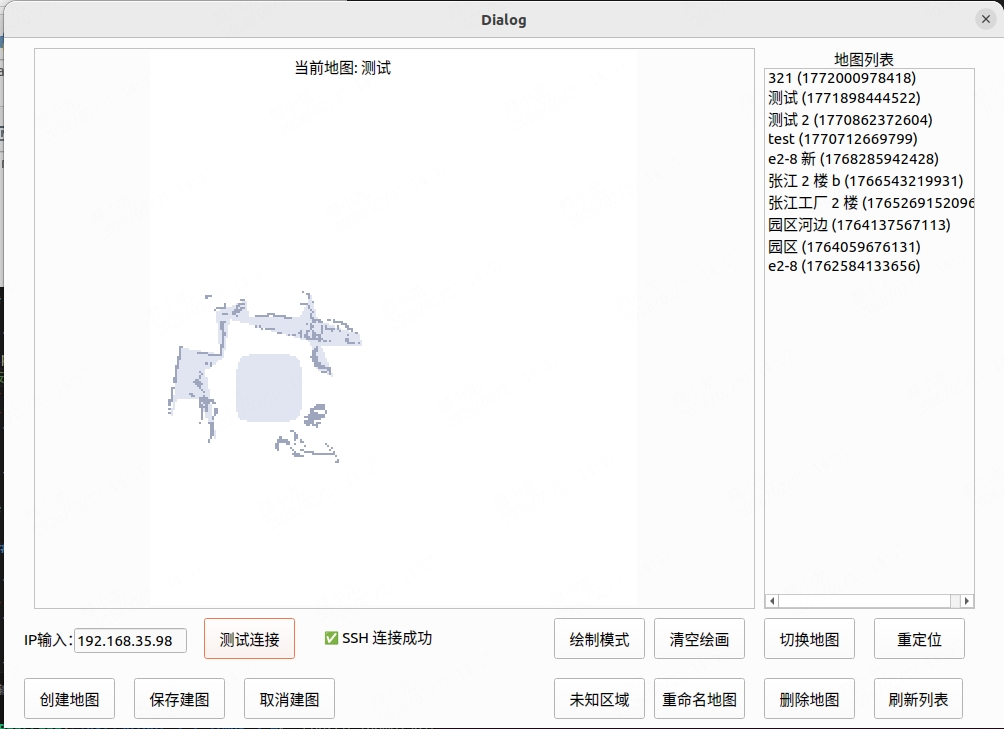
For detailed usage instructions of the sample program in examples/mm/ui, refer to examples/mm/ui/readme.md.