
3. Overview of the Software System
3. Overview of the Software System
The robot is equipped with an x86_64 architecture industrial PC, running Ubuntu 22.04, and uses systemd as the system service manager. The agibot_em.service is configured as the entry point for the Agibot software system. This service starts automatically on boot and launches the EM (process startup management) and SM (process status management) modules. The EM and SM then work together to start the remaining module processes. The SM manages the state (start and stop) of process lists under different system modes.
The configuration file paths for EM and SM are /agibot/software/v0/entry/bin/cfg/run_agibot.yaml and /agibot/software/v0/entry/bin/cfg/sm.yaml, respectively. The former lists the default processes to be started, while the latter specifies which groups of processes are enabled in each system mode.
The following diagram shows the logical layout of the main processes on the robot, displaying only the primary interaction relationships. Not all processes are started at the same time.
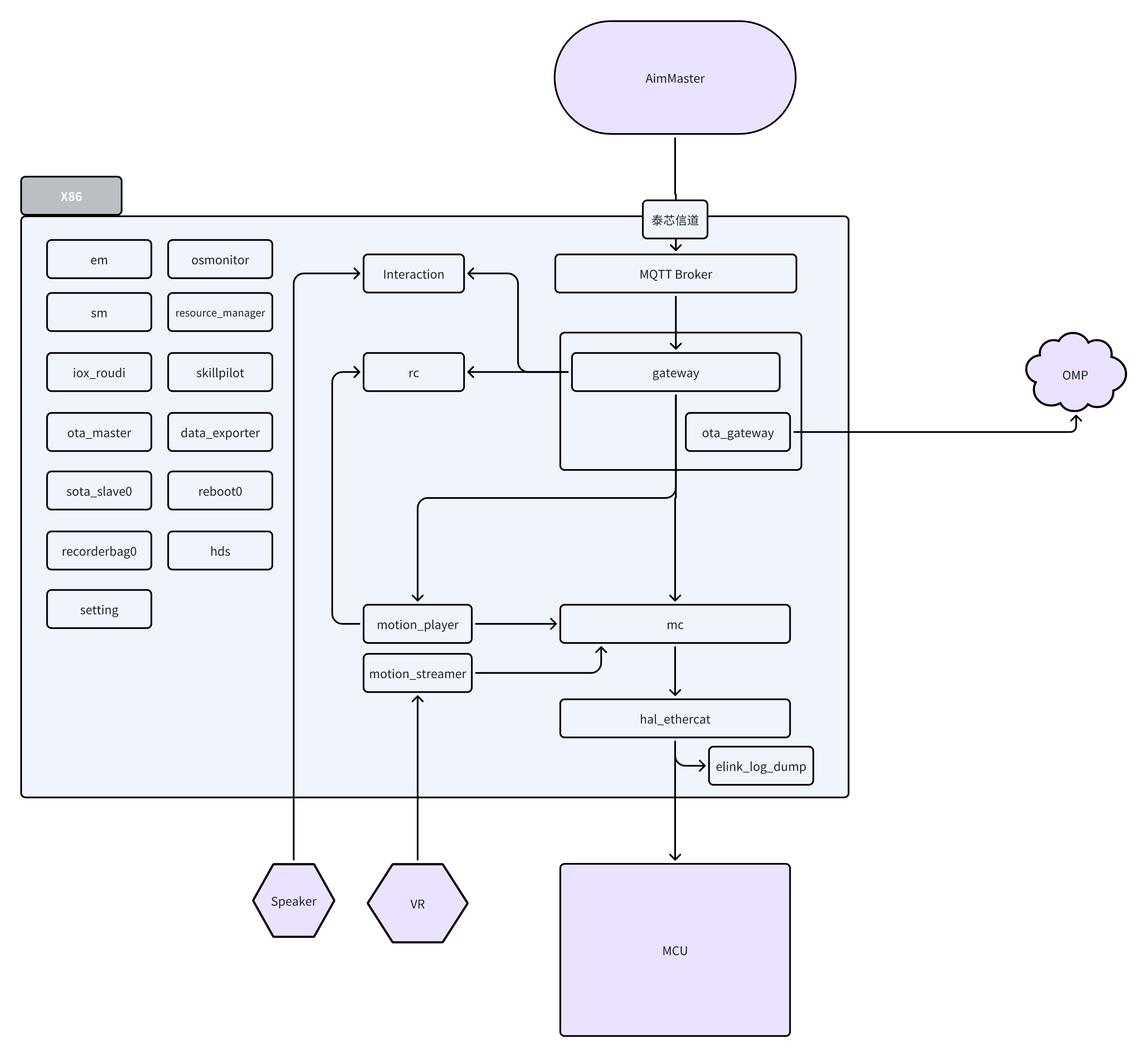
The table below provides explanations for the terms used in the diagram:
| Name | Description/Function | |
|---|---|---|
| AimMaster | Client Software | Used to operate the basic functions of the robot |
| OMP | Agibot Cloud Platform | Responsible for receiving and processing telemetry data from the client side |
| Speaker | Speaker | Used to play sounds |
| VR | Virtual Reality Device | Used for remote operation of the robot |
| MCU | Microcontroller | Controls the robot's motors, receives motor and IMU information, communicates with HAL Ethercat to receive control instructions, and uploads motor and IMU information |
| MQTT Broker | MQTT Gateway | Gateway node that interfaces with AimMaster and the onboard software |
| em | Process Management Module | Responsible for starting processes and querying their status |
| sm | System Status Management Module | Manages system state transitions and controls the process list |
| iox_roudi | Iceoryx Shared Memory Central Node | Manages the central scheduling for Iceoryx communication |
| ota_mastersota_slave0ota_gateway | OTA Related Function Modules | Handles downloading OTA packages and executing the OTA process |
| recordbag0 | Data Recording Module | Records diagnostic data packets |
| setting | System Settings Module | Manages device settings such as WIFI and volume |
| osmonitor | System Monitoring Module | Monitors system resource usage and basic operational status |
| resource_manager | Resource Management Module | Manages actions on the robot |
| skillpilot | Skill Scheduling Module | Manages and arbitrates the execution of basic robot skills |
| data_exporter | Data Export Module | Compresses and exports diagnostic data packets |
| reboot0 | Reboot Script | Reboots the system when called by the SM |
| hds | Health Diagnosis Module | Receives and processes fault information from various modules |
| Interaction | Voice Interaction Module | Used for playing music and prompts, does not handle large model interactions |
| rc | Remote Control Module | Provides an interface for AimMaster to call basic robot functions such as expressions, movements, and walking |
| motion_player | Motion Playback Module | Plays specified motion files |
| motion_streamer | Motion Streaming Module | Dedicated to remote operation, maps VR and motion capture suit data to the robot's upper limb joint movements |
| gateway | Gateway Module | Forwards external requests to internal modules, primarily from AimMaster |
| mc | Motion Control Module | Manages the overall motion control of the robot |
| hal_ethercat | Hardware Abstraction Layer Module | Communicates with the MCU via EtherCAT, transmitting hardware status and commands |
| elink_log_dump | EtherCAT Communication Log Module | Logs the communication between hal_ethercat and the MCU |
Different sets of software functionalities are enabled under different system modes. The specific configurations are as follows (excerpted from /agibot/software/v0/entry/bin/cfg/sm.yaml):
 system_modes:
    "Startup": # Status Name
      next_mode_list: [ "Ready", "OTA", "Poweroff" ]  # List of Transitionable States
      active_FG_list: [ "System", "EStop", "RC", "MoCap", "Gateway" ]  # List of Functional Groups to Maintain
      action_list:
        - [ DIFF ]

    "Poweroff":
      next_mode_list: []
      active_FG_list: []
      action_list:
        - [ open Poweroff ]

    "Reboot":
      next_mode_list: []
      active_FG_list: []
      action_list:
        - [ open Reboot ]

    "Ready":
      next_mode_list: [ "Manual", "EStop", "Poweroff" ]
      active_FG_list: [ "System", "EStop", "RC", "MoCap", "Gateway" ]
      action_list:
        - [ DIFF ]

    "OTA":
      next_mode_list: [ "Reboot", "Ready", "Poweroff" ]
      active_FG_list: [ "System", "OTA", "Gateway" ]
      action_list:
        - [ DIFF ]

    "Manual":
      next_mode_list: [ "OTA", "Auto", "Reset", "EStop", "Poweroff", "Safe", "MotionStream" ]
      active_FG_list: [ "System", "EStop", "RC", "MoCap", "Gateway", "Motion" ]
      action_list:
        - [ DIFF ]
        - [ activate rc ]
      post_process:
        - level: 47
          action_list: [ [ fallback mc ] ]

    "Reset":
      next_mode_list: [ "Reboot", "Poweroff" ]
      active_FG_list: [ "System", "OTA", "Gateway" ]
      action_list:
        - [ DIFF ]

    "EStop":
      next_mode_list: [ "Ready", "OTA", "Poweroff" ]
      active_FG_list: [ "System", "EStop", "RC", "MoCap", "Gateway" ]
      action_list:
        - [ DIFF ]

    "Safe":
      next_mode_list: [ "Manual", "EStop", "Poweroff" ]
      active_FG_list: [ "System", "EStop", "Gateway", "Motion", "RC", "MoCap"]
      action_list:
        - [ DIFF ]
        - [ deactivate mc, deactivate rc  ]

    # Real-time Teleoperation Status, used for real-time teleoperation
    "MotionStream":
      next_mode_list: [ "Manual", "EStop", "Poweroff" ]
      active_FG_list: [ "System", "EStop", "RC", "Gateway", "Motion", "MoStream" ]
      action_list:
        - [ DIFF ]
        - [ activate rc ]
Upon startup, the system transitions from Startup to Ready and then to Manual. When it reaches the Manual state, the initialization of the onboard software can be considered complete.