
4. Overview of Secondary Development Interfaces
4. Overview of Secondary Development Interfaces
Most of the modules in the aforementioned software system use AimRT as the underlying framework. AimRT is a robot runtime framework that aligns with ROS2, open-sourced by Agibot Robotics in September 2024. AimRT provides two basic underlying communication methods: Channel and RPC (for more details, refer to the AimRT official documentation). These two communication methods can correspond to multiple different communication backends.
To reduce the cognitive burden of secondary development, we provide two forms of relatively simple and general interfaces for secondary development: HTTP JSON RPC and ROS2 Topic. HTTP JSON RPC is suitable for low-frequency, one-to-many interface calls, while ROS2 Topic is suitable for high-frequency, many-to-many interface calls. The following are diagrams of both:
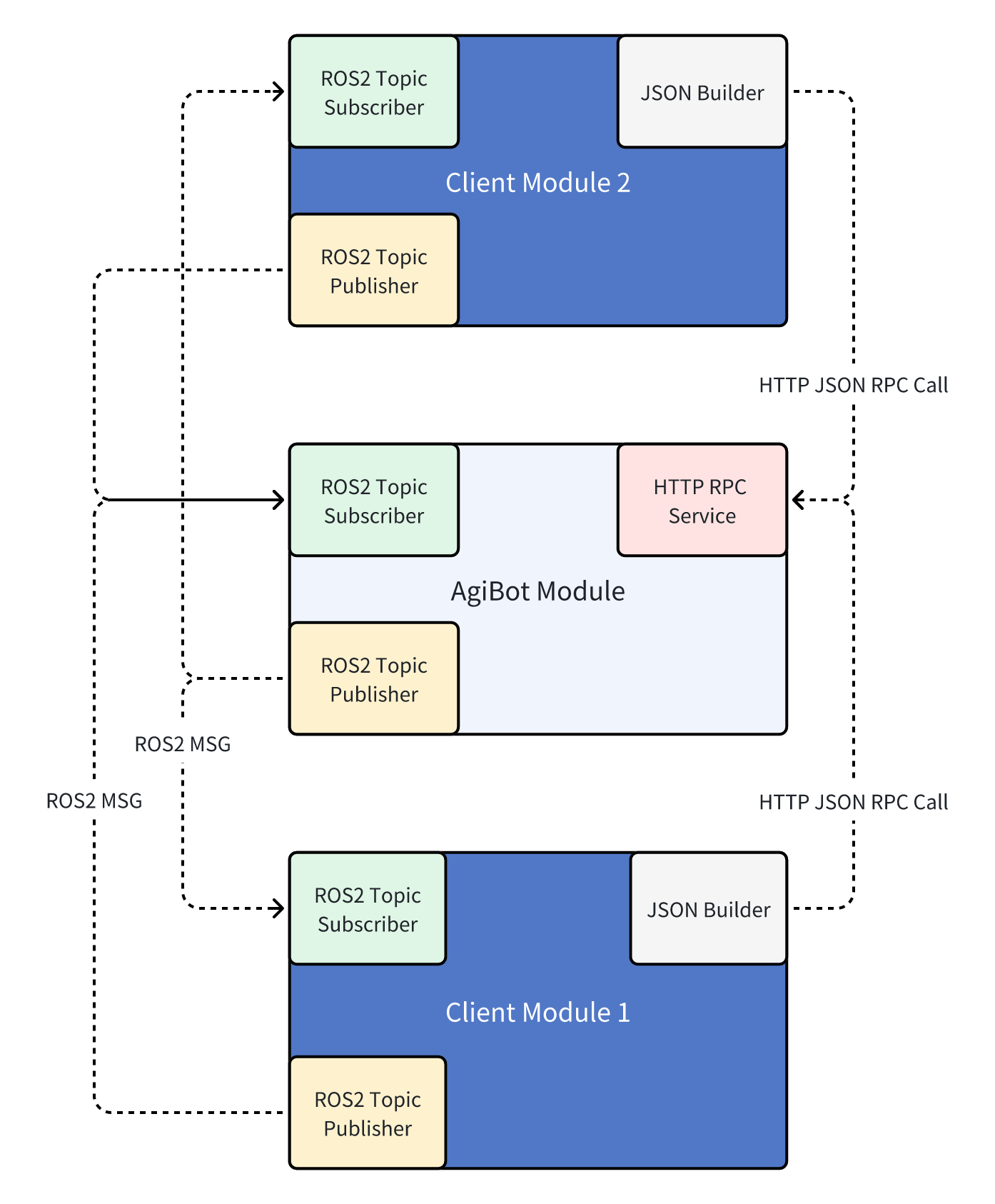
For development languages, there are no restrictions on the language used for secondary development programs. As long as they can send and receive HTTP messages, they can call all HTTP JSON RPC interfaces. As long as they support ROS2 Humble and can send and receive ROS2 topic messages, they can call all the body's ROS2 Topic interfaces.
Here are two specific interface call examples to provide a clearer understanding of the interfaces:
4.1 HTTP JSON RPC
The following is an example of a command-line RPC request to get the battery level:
curl -i     -H 'content-type:application/json' \
            -H 'timeout: 1000'   -X POST 'http://127.0.0.1:56421/rpc/aimdk.protocol.HalBmsService/GetBmsState' \
            -d '{}'
Where:
127.0.0.1is the IP address of the robot's X86 development board. Here, it is set to the localhost address, which can only be called locally on the X86. For remote calls, you can change this IP to the IP corresponding to the robot's X86 development board WiFi card (which can be checked using the AimMaster software or by runningip aon the X86).56421is the HTTP port number for the corresponding service. This will generally be provided in detailed interface examples.content-type:application/jsonis the request header, indicating that the request body is in JSON format. This request header must be included.timeout: 1000is the request header, indicating the request timeout time in milliseconds. Here, it is set to 1000 milliseconds, or 1 second. This field is optional.aimdk.protocol.HalBmsService/GetBmsStateis the name of the RPC interface for getting the battery state. The specific names of each interface can be found in the corresponding interface documentation and examples.'{}'is the request body. Here, it is empty, representing that all fields are set to their default values. If you need to pass specific fields, you can pass a JSON string, for example,'{"bms_state": 1}'indicates passing thebms_statefield with a value of 1 (this is just an example; the specific field names and values should be referenced from the corresponding interface documentation and examples).
4.2 ROS2 Topic
4.2.1 Environment Variable Setup
The topic interface uses native ROS2 topics. The default on the machine is ROS2 Humble with Fastdds. Before calling any ROS2 Topic interface, you must set some environment variables as follows:
source /opt/ros/humble/setup.bash
export ROS_DOMAIN_ID=232
export ROS_LOCALHOST_ONLY=0
export FASTRTPS_DEFAULT_PROFILES_FILE=/agibot/software/v0/entry/bin/cfg/ros_dds_configuration.xml
If your program needs to start with root privileges, change the above dds configuration file to the following:
bashexport FASTRTPS_DEFAULT_PROFILES_FILE=/agibot/software/v0/entry/bin/cfg/privileged_ros_dds_configuration.xmlIn
ros_dds_configuration.xml, both shared memory communication and UDP communication are enabled, while inprivileged_ros_dds_configuration.xml, only UDP communication is enabled to avoid permission issues with shared memory.
4.2.2 QoS Settings
Additionally, note that the default QoS for topics on the machine is:
  history: keep_last
  depth: 10
  reliability: best_effort
When using, ensure that the QoS is consistent to guarantee smooth communication.
4.2.3 Call Example
The following is an example script for subscribing to joint states via ROS2 Topic.
#!/usr/bin/env python3
import rclpy
from rclpy.node import Node
from rclpy.qos import QoSHistoryPolicy, QoSProfile, QoSReliabilityPolicy
from sensor_msgs.msg import JointState

class JointStateSubscriber(Node):
    def __init__(self, topic_name: str):
        super().__init__("joint_state_subscriber")

        self.topic_name = topic_name

        qos_profile = QoSProfile(
            history=QoSHistoryPolicy.KEEP_LAST, depth=10, reliability=QoSReliabilityPolicy.BEST_EFFORT
        )

        self.subscription = self.create_subscription(JointState, topic_name, self.listener_callback, qos_profile)

    def listener_callback(self, msg: JointState):
        self.get_logger().info(f"=== Received {self.topic_name} ===")
        self.get_logger().info(f"  header: {msg.header}")
        self.get_logger().info(f"  name: {msg.name}")
        self.get_logger().info(f"  position: {msg.position}")
        self.get_logger().info(f"  velocity: {msg.velocity}")
        self.get_logger().info(f"  effort: {msg.effort}")

def main(args=None):
    rclpy.init(args=args)
    # Arm Joint Status: /motion/control/arm_joint_state
    # Neck Joint Status: /motion/control/neck_joint_state
    joint_state_node = JointStateSubscriber("/motion/control/arm_joint_state")
    try:
        rclpy.spin(joint_state_node)
    except KeyboardInterrupt:
        pass
    finally:
        joint_state_node.destroy_node()
        rclpy.shutdown()

if __name__ == "__main__":
    main()
4.2.4 External PC Communication for ROS2 Topics
To ensure the stability of ROS2 communication on the machine, we have modified the DDS communication configuration file. For non-root processes, shared memory communication and UDP communication are enabled by default, as shown below (located at /agibot/software/v0/entry/bin/cfg/ros_dds_configuration.xml on the X86 development board):
<?xml version="1.0" encoding="UTF-8"?>
<dds>
  <profiles xmlns="http://www.eprosima.com/XMLSchemas/fastRTPS_Profiles">
    <transport_descriptors>
      <transport_descriptor>
        <transport_id>UDPv4_transport</transport_id>
        <type>UDPv4</type>
        <interfaceWhiteList>
          <address>127.0.0.1</address>
          <address>10.42.0.100</address>
        </interfaceWhiteList>
      </transport_descriptor>
      <transport_descriptor>
        <transport_id>SHM_transport</transport_id>
        <type>SHM</type>
        <segment_size>8388608</segment_size>
        <port_queue_capacity>1024</port_queue_capacity>
      </transport_descriptor>
    </transport_descriptors>

    <participant profile_name="participant_profile" is_default_profile="true">
      <rtps>
        <useBuiltinTransports>false</useBuiltinTransports>
        <userTransports>
          <transport_id>SHM_transport</transport_id>
          <transport_id>UDPv4_transport</transport_id>
        </userTransports>
      </rtps>
    </participant>
  </profiles>
</dds>
The whitelist for network interfaces is configured with two IPs: 127.0.0.1 and 10.42.0.100, which are the local loopback IP and the IP for the remote control network interface, respectively. If you need to receive and send the corresponding ROS2 Topics on a third-party PC or an added industrial control computer, you need to add the IP of the local network interface (generally, you can choose 192.168.2.50, which is the fixed IP for the debugging network port on the back of the robot, or the reserved IP for the added computing board 192.168.100.100) to the whitelist (both privileged and non-privileged need to be added). After adding, restart the robot and connect via a wired connection to the corresponding network port to perform the communication.
Using asymmetric dds whitelists in ROS2 Humble can sometimes lead to unpredictable communication issues. Please ensure that the dds whitelist configurations are consistent.