
3. Overview of Secondary Development Interfaces
3. Overview of Secondary Development Interfaces
Most of the modules in the aforementioned software system use AimRT as the underlying framework. AimRT is a robot runtime underlying framework that benchmarks against ROS2, open-sourced by Agibot Robotics in 09/2024. AimRT provides two basic underlying communication methods: Channel and RPC (for more details, refer to the AimRT official documentation). These two communication methods can correspond to multiple different communication backends.
To reduce the cognitive load of secondary development, we provide two forms of relatively simple and general interfaces for secondary development: HTTP JSON RPC and ROS2 Topic. HTTP JSON RPC is suitable for low-frequency interface one-to-many calls, while ROS2 Topic is suitable for high-frequency interface many-to-many calls. The following are the two
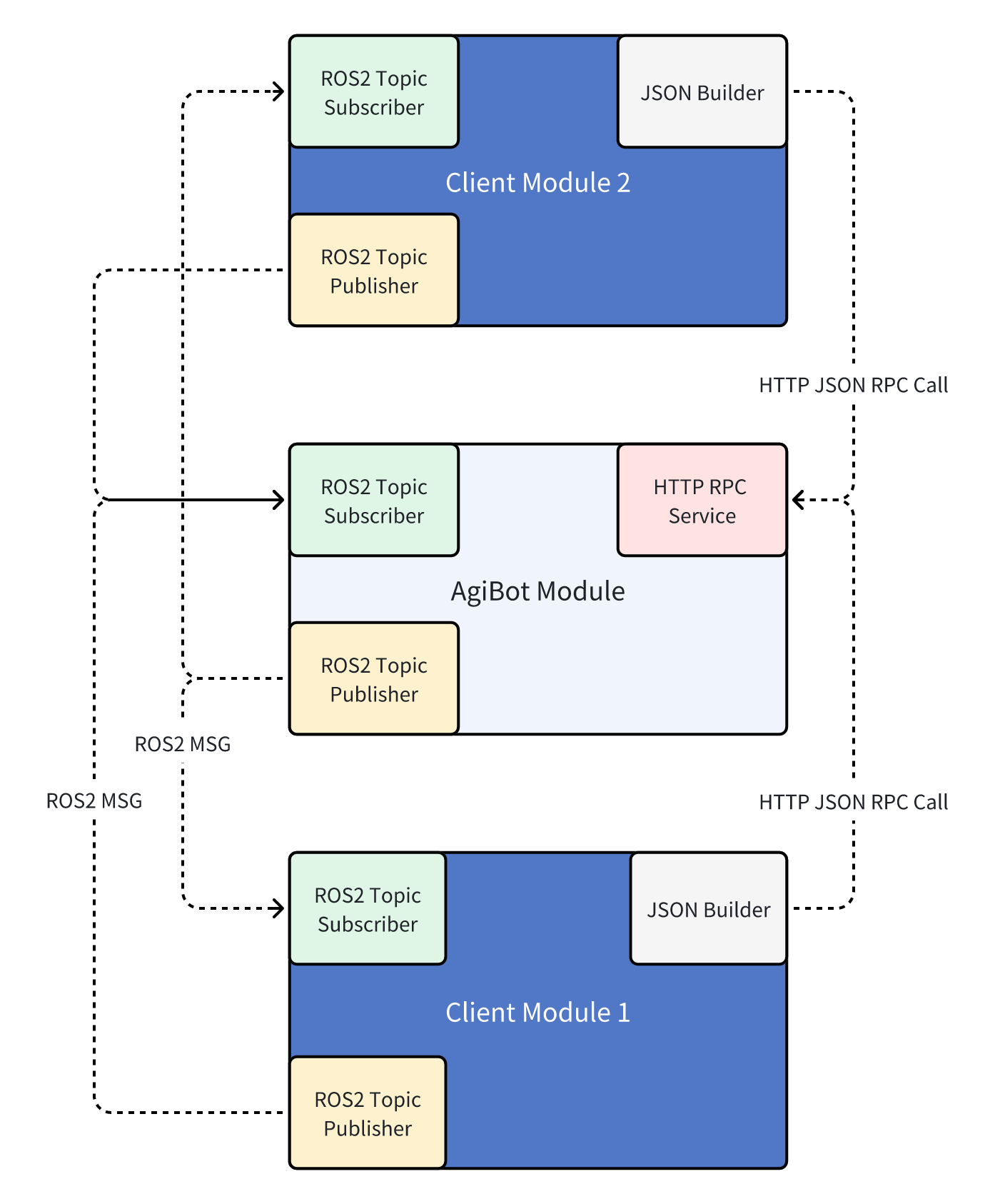
For the development language, there is no restriction on any development language for secondary development programs. As long as they can send and receive HTTP messages, all HTTP JSON RPC interfaces can be called. As long as they support ROS2 Humble with Fastdds, they can send and receive ROS2 topic messages and call all the body ROS2 Topic interfaces.
Here are two specific interface call examples to establish a clearer understanding of the interfaces:
3.1 HTTP JSON RPC
The following is an example of a command-line RPC request to get the battery power level:
curl -i     -H 'content-type:application/json' \
            -H 'timeout: 1000'   -X POST 'http://192.168.100.100:56421/rpc/aimdk.protocol.HalBmsService/GetBmsState' \
            -d '{}'
Where:
192.168.100.110is the IP address of the robot's X86 industrial PC. This should be the IP address of the interconnected industrial PCs. You can execute the call on ORIN. If you need to call it remotely, change this IP to the IP corresponding to the WiFi network card of the robot's X86 development board (you can check this via the AimMaster software or by runningip aon the X86).56421is the HTTP port number for the corresponding service. This will generally be provided in detailed interface examples.content-type:application/jsonis the request header, indicating that the request body is in JSON format. This request header must be included.timeout: 1000is the request header, indicating the request timeout time in milliseconds. Here it is set to 1000 milliseconds, which is 1 second. This field can be omitted.aimdk.protocol.HalBmsService/GetBmsStateis the name of the RPC interface to get the battery state. The specific names of each interface can be found in the corresponding interface documentation and examples.'{}'is the request body. An empty body here means that all fields are default values. If you need to pass specific fields, you can pass a JSON string, for example,'{"bms_state": 1}'indicates passing thebms_statefield with a value of 1 (this is just an example; the specific field names and values should be referenced from the corresponding interface documentation and examples).
3.2 ROS2 Topic
3.2.1 Environment Variable Setup
The topic interfaces use native ROS2 topics. The machine defaults to ROS2 Humble with Fastdds. Before calling any ROS2 Topic interface, some environment variables must be set as follows:
source /opt/ros/humble/setup.bash
export ROS_DOMAIN_ID=232
export ROS_LOCALHOST_ONLY=0
export FASTRTPS_DEFAULT_PROFILES_FILE=/agibot/software/v0/entry/bin/cfg/ros_dds_configuration.xml
If your program needs to start with root privileges, change the above dds configuration file to use the following configuration file:
bashexport FASTRTPS_DEFAULT_PROFILES_FILE=/agibot/software/v0/entry/bin/cfg/privileged_ros_dds_configuration.xmlIn
ros_dds_configuration.xml, both shared memory communication and UDP communication are enabled, while inprivileged_ros_dds_configuration.xml, only UDP communication is enabled to avoid permission issues with shared memory.
Note that environment variables are only effective in the current terminal. If you open a new terminal, you need to set them again.
3.2.2 QoS Settings
Additionally, note that the default QoS for topics on the machine is
  history: keep_last
  depth: 10
  reliability: best_effort
When using, ensure that the QoS is consistent to guarantee smooth communication.
3.2.3 Call Example
The following is an example script for subscribing to joint state ROS2 Topics.
#!/usr/bin/env python3
import rclpy
from rclpy.node import Node
from rclpy.qos import QoSHistoryPolicy, QoSProfile, QoSReliabilityPolicy
from sensor_msgs.msg import JointState

class JointStateSubscriber(Node):
    def __init__(self, topic_name: str):
        super().__init__("joint_state_subscriber")

        self.topic_name = topic_name

        qos_profile = QoSProfile(
            history=QoSHistoryPolicy.KEEP_LAST, depth=10, reliability=QoSReliabilityPolicy.BEST_EFFORT
        )

        self.subscription = self.create_subscription(JointState, topic_name, self.listener_callback, qos_profile)

    def listener_callback(self, msg: JointState):
        self.get_logger().info(f"=== Received {self.topic_name} ===")
        self.get_logger().info(f"  header: {msg.header}")
        self.get_logger().info(f"  name: {msg.name}")
        self.get_logger().info(f"  position: {msg.position}")
        self.get_logger().info(f"  velocity: {msg.velocity}")
        self.get_logger().info(f"  effort: {msg.effort}")

def main(args=None):
    rclpy.init(args=args)
    # Arm joint status: /motion/control/arm_joint_state
    # Neck joint status: /motion/control/neck_joint_state
    joint_state_node = JointStateSubscriber("/motion/control/arm_joint_state")
    try:
        rclpy.spin(joint_state_node)
    except KeyboardInterrupt:
        pass
    finally:
        joint_state_node.destroy_node()
        rclpy.shutdown()

if __name__ == "__main__":
    main()
3.2.4 External PC Communication for ROS2 Topics
To ensure the stability of ROS2 communication on the machine, we have modified the default DDS communication configuration file to restrict ROS2 traffic to flow only between the X86 and ORIN industrial PCs, and not to external devices. For non-root processes, shared memory communication and UDP communication are enabled by default. The corresponding configuration files are located at /agibot/software/v0/entry/bin/cfg/ros_dds_configuration.xml on both industrial PCs. The configuration file on ORIN is as follows:
<?xml version="1.0" encoding="UTF-8"?>
<dds>
  <profiles xmlns="http://www.eprosima.com/XMLSchemas/fastRTPS_Profiles">
    <transport_descriptors>
      <transport_descriptor>
        <transport_id>UDPv4_transport</transport_id>
        <type>UDPv4</type>
        <sendBufferSize>10388608</sendBufferSize>
        <receiveBufferSize>10388608</receiveBufferSize>
        <interfaceWhiteList>
          <address>192.168.100.110</address>
        </interfaceWhiteList>
      </transport_descriptor>
      <transport_descriptor>
        <transport_id>SHM_transport</transport_id>
        <type>SHM</type>
        <segment_size>8388608</segment_size>
        <port_queue_capacity>1024</port_queue_capacity>
      </transport_descriptor>
    </transport_descriptors>

    <participant profile_name="participant_profile" is_default_profile="true">
      <rtps>
        <useBuiltinTransports>false</useBuiltinTransports>
        <userTransports>
          <transport_id>SHM_transport</transport_id>
          <transport_id>UDPv4_transport</transport_id>
        </userTransports>
      </rtps>
    </participant>
  </profiles>
The whitelist includes the IP 192.168.100.110, which is the IP of the network card connecting ORIN and X86. Adding this IP ensures that topics published and subscribed to on ORIN can communicate normally with the X86 industrial PC. If you need to receive and send the corresponding ROS2 Topics on a third-party PC or an additional industrial PC, you need to add the IP of the local network card, usually 192.168.2.50, to the whitelist (/agibot/software/v0/entry/bin/cfg/ros_dds_configuration.xml and /agibot/software/v0/entry/bin/cfg/privileged_ros_dds_configuration.xml). After adding, restart the robot and connect via a wired connection to the corresponding network port to perform the corresponding ROS2 communication.
For the X86 industrial PC, the debug network port on the right side of the back is in DHCP mode. If you need to connect the ROS2 communication on the X86 with a third-party PC/industrial PC, you need to configure the network port to manually specify a fixed IP of 192.168.2.150 (modify /etc/netplan/01-netcfg.yaml), and then directly connect or connect through a switch. The network topology is as follows:
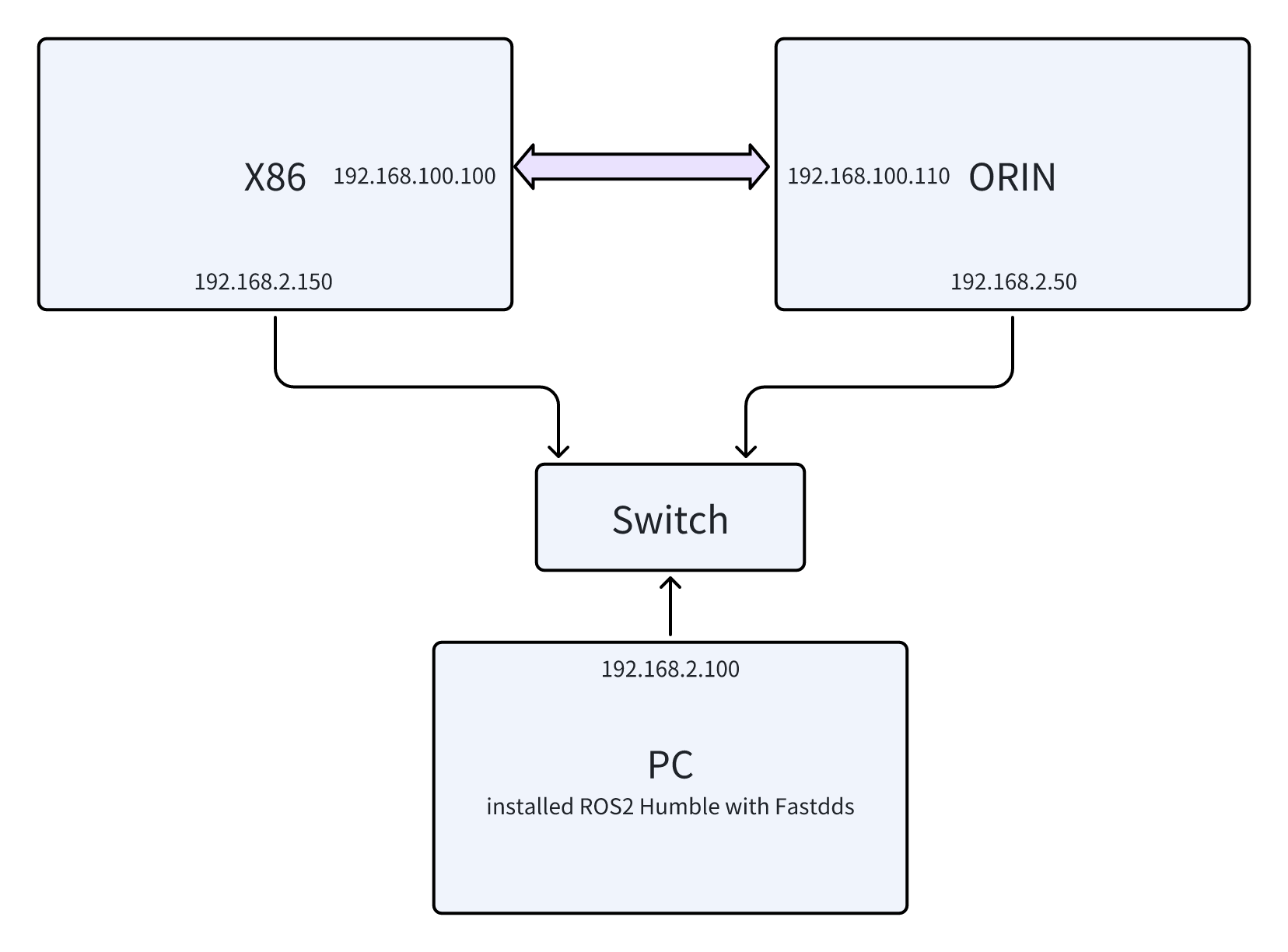
If you only need to connect to one industrial PC, you do not need a switch and can directly connect with a network cable. In this case, you need to add the IP 192.168.2.150 to the dds whitelist on the X86 industrial PC (/agibot/software/v0/entry/bin/cfg/ros_dds_configuration.xml and /agibot/software/v0/entry/bin/cfg/privileged_ros_dds_configuration.xml).
Using asymmetric dds whitelists in ROS2 Humble version can sometimes lead to unpredictable communication issues. Please ensure that the dds whitelist configurations are consistent.