
5. Secondary Development Program Deployment
5. Secondary Development Program Deployment
Secondary development programs are generally recommended to be deployed in two ways: on the main body ORIN or on a third-party industrial PC. The ORIN deployment is more hardware-efficient and suitable for secondary development programs that do not require much resource usage. If more resources are needed, some of the existing programs on the ORIN need to be closed to release CPU/GPU resources; deploying on a third-party industrial PC requires additional cabling, usually with external cabling configuration. The advantage is that all the original software functions on the machine can be retained, while also having relatively sufficient computing resources.
5.1 Main Body ORIN Deployment
The recommended directory for program deployment is /agibot/data/home/agi/Desktop. The disk cleanup module on the machine will periodically clean up space, and this folder is on the whitelist and will not be cleaned.
mkdir -p /agibot/data/home/agi/Desktop
If you encounter permission issues, consider using the following command to create the folder:
sudo mkdir -p /agibot/data/home/agi/Desktop
sudo chown -R agi:agi /agibot/data/home/agi
5.1.1 Python Virtual Environment
For secondary development using Python, you only need to create a virtual environment. You can use tools like conda/venv to create a virtual environment, where venv is a built-in tool, and conda installation can refer to the miniconda official installation documentation.
5.1.2 Docker Deployment
If using C++ or other compiled languages, or if certain system dependencies need to be installed or modified, consider using Docker for deployment.
Refer to https://docs.docker.com/engine/install/ubuntu/#install-from-a-package for Docker installation, and do not use apt for program installation.
5.1.2.1 Modify Docker Default Data Path
The default data path for Docker, /var/lib/docker, has a small partition capacity. You need to change its default data storage path to a whitelist path.
- Move the default storage pathbash
# Stop the Docker service sudo systemctl stop docker # Move the default storage path(please create the target path first /agibot/data/home/agi/Desktop) sudo mv /var/lib/docker /agibot/data/home/agi/Desktop - Modify the configuration filebash
# Modify Docker configuration
sudo vim /etc/docker/daemon.json
Add the following to the configuration file:json{ "data-root": "/agibot/data/home/agi/Desktop/docker" } - Restart Docker:bash
sudo systemctl start docker
Docker configuration is complete.
5.1.2.2 ROS2 Communication Settings Inside and Outside the Container
By default, the container cannot normally communicate with the onboard system via ROS2, and some configuration is required.
- When creating the container, share IPC and network communication with the host, adding the following optionsbash
--ipc=host --net=host - Use the same agi user inside the container as on the ORIN, with uid and gid both set to 1001bash
groupadd -g 1001 agi && useradd -u 1001 -g 1001 -m -s /bin/bash agi - Use the same DDS configuration file inside and outside the container. Copy the /agibot/software/v0/entry/bin/cfg/ros_dds_configuration.xml from the ORIN to the container. Before running ROS2 programs or using ros2 commands in the container, execute the following command (replace /path/to with the actual path)bash
source /opt/ros/humble/setup.bash export ROS_DOMAIN_ID=232 export ROS_LOCALHOST_ONLY=0 export FASTRTPS_DEFAULT_PROFILES_FILE=/path/to/ros_dds_configuration.xml - At this point, the container should be able to receive ROS2 topics published by the ORINbash
ros2 topic list
5.2 Third-Party Industrial PC Deployment
Recommended network topology configuration:
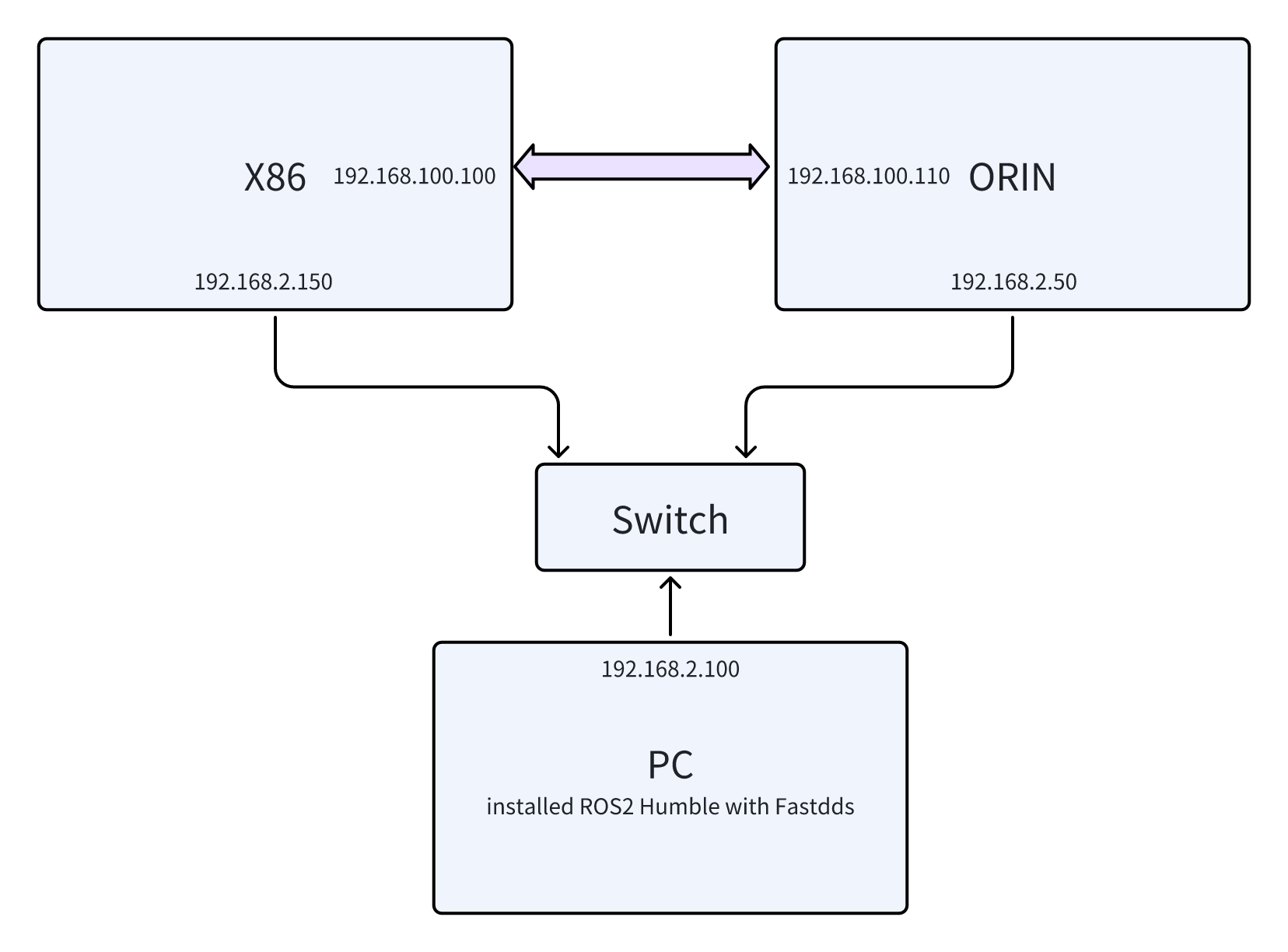
- Set the X86 debugging network port to a fixed IP of 192.168.2.150, and modify the eth_debug or enp2s0f1 in the
/etc/netplan/01-netcfg.yamlfile to a fixed IP of 192.168.2.150. - Modify the DDS configuration files for the ORIN and X86,
/agibot/software/v0/entry/bin/cfg/ros_dds_configuration.xmland/agibot/software/v0/entry/bin/cfg/privileged_ros_dds_configuration.xml. Add<address>192.168.2.50</address>to the ORIN configuration file and<address>192.168.2.150</address>to the X86 configuration file, then restart the robot. - Set the wired network port of the PC to a fixed IP of 192.168.2.100, and install ROS2 Humble with Fastdds on it. Following the wiring diagram above, you can correctly communicate with the robot's industrial PC via ROS2. Note that before running ROS2 programs, you need to set the following environment variablesbash
source /opt/ros/humble/setup.bash
export ROS_DOMAIN_ID=232
export ROS_LOCALHOST_ONLY=0