The A2 robot comes pre-installed with motion control programs, allowing users to directly control the robot's movement by sending high-level linear and angular velocity commands. There is no need to develop low-level control models for walking or other functions. Additionally, the upper limb and neck joint interfaces provide direct access to hardware interfaces at the HAL layer.
By default, the low-level control interface for the lower limb joint motors is not open; they can only be controlled through high-level speed commands. If you need to develop your own motion control algorithms to replace the Agibot factory-installed algorithms, please refer to the "A2 Ultra Low-Level Motion Control Development Guide" in the documentation. Please read the risk warnings and safety precautions for motion control development carefully before proceeding.
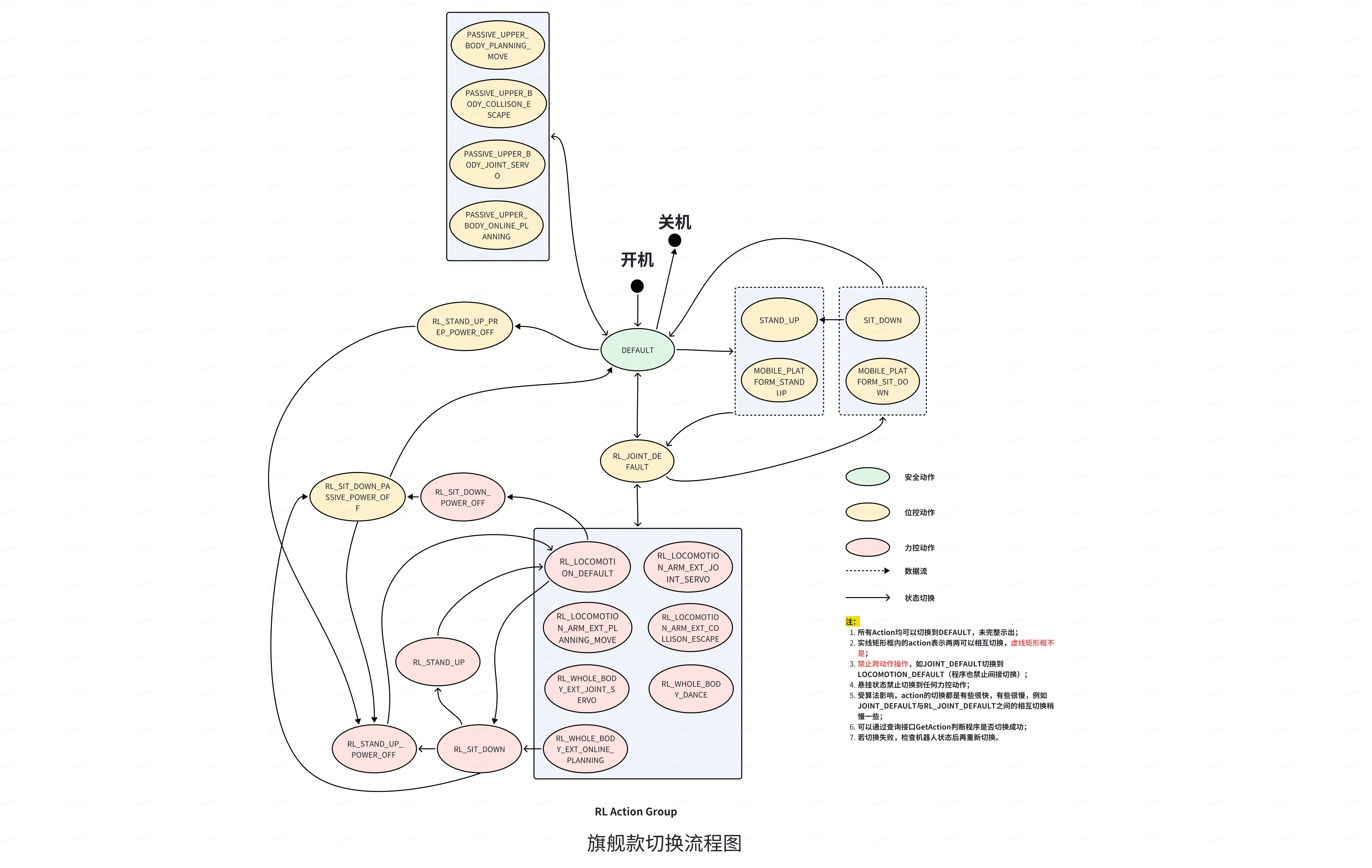
The Agibot motion control program is designed with a state machine that switches between different models and opens different upper limb control interfaces based on the current state. The state machine is shown in the following diagram:
Descriptions of each state are as follows:
Action Type
Action Code
Chinese Name
Detailed Description
Callable Control Interfaces
Safety Action
DEFAULT
Default Mode
The default action after the motion control starts
Position Control Action
RL_JOINT_DEFAULT
Reinforced Position Control Standing Mode
The robot stands with reinforced position control, straight legs
Position Control Action
PASSIVE_UPPER_BODY_JOINT_SERVO
Lower Limb Passive, Upper Limb Servo Mode
Lower limbs are not enabled, arms can receive external joint servo commands
/motion/control/arm_joint_command
/motion/control/neck_joint_command
/motion/control/hand_joint_command
Position Control Action
PASSIVE_UPPER_BODY_PLANNING_MOVE
Lower Limb Passive, Upper Limb RRT Planning Mode
Lower limbs are not enabled, upper limb path planning, RPC receives target joint angles or SE3 positions
Lower limbs are not enabled, upper limb avoids self-collision, can be used when the planning interface cannot be called after a collision, switching to this action will automatically separate
Position Control Action
PASSIVE_UPPER_BODY_ONLINE_PLANNING
Lower Limb Passive, Upper Limb NMPC Planning Mode
Lower limbs are not enabled, upper limb path planning, RPC receives target joint angles or SE3 positions, can interrupt the current target
PlanningMove
Position Control Action
SIT_DOWN
Position Control Sitting Mode
Lower limb action, upper limbs remain still, works with a chair to sit down
Position Control Action
STAND_UP
Position Control Standing Up Mode
Lower limb action, upper limbs remain still, works with a chair to stand up
Position Control Action
MOBILE_PLATFORM_STAND_UP
Mobile Platform Position Control Standing Up Mode
Lower limb action, upper limbs remain still
Position Control Action
MOBILE_PLATFORM_SIT_DOWN
Mobile Platform Position Control Sitting Down Mode
Lower limb action, upper limbs remain still
Position Control Action
RL_SIT_DOWN_PASSIVE_POWER_OFF
Reinforced Deep Sit and Lean Back Mode
Lower limb action, upper limbs remain still, experimental feature, not recommended for use
Position Control Action
RL_STAND_UP_PREP_POWER_OFF
Reinforced Deep Sit and Stand Up Preparation Mode
Lower limb action, upper limbs remain still, experimental feature, not recommended for use
Force Control Action
RL_LOCOMOTION_DEFAULT
Reinforced Walking Mode
Human-like walking mode trained with reinforcement learning, arms swing while walking
/motion/control/locomotion_velocity
Force Control Action
RL_LOCOMOTION_ARM_EXT_JOINT_SERVO
Reinforced Walking with Upper Limb Servo Mode
Lower limbs walk or stand in a human-like manner, upper limbs accept external joint servo commands, perform actions while walking or standing (uses a full-body control reinforcement model, more stable)
/motion/control/locomotion_velocity
/motion/control/arm_joint_command
/motion/control/neck_joint_command
/motion/control/hand_joint_command
Force Control Action
RL_LOCOMOTION_ARM_EXT_PLANNING_MOVE
Reinforced Standing with Upper Limb RRT Planning Mode
Lower limbs stand with force control, upper limb path planning, RPC receives target joint angles or SE3 positions
/motion/control/locomotion_velocity
PlanningMove
Force Control Action
RL_LOCOMOTION_ARM_EXT_COLLISON_ESCAPE
Reinforced Standing with Upper Limb Collision Avoidance Mode
Lower limbs stand with force control, upper limb avoids self-collision, can be used when the planning interface cannot be called after a collision, switching to this action will automatically separate
/motion/control/locomotion_velocity
Force Control Action
RL_WHOLE_BODY_EXT_JOINT_SERVO
Whole Body Action with Upper Limb Servo Mode
Lower limbs stand with force control, arms can receive external joint servo commands, additional waist control, the A2 robot does not have actual degrees of freedom in the waist, waist movements are achieved through leg motor coordination
/motion/control/locomotion_velocity
/motion/control/arm_joint_command
/motion/control/neck_joint_command
/motion/control/hand_joint_command
/motion/control/move_waist
/motion/control/move_waist_lift
/motion/control/move_waist_pitch
/motion/control/move_waist_twist
Force Control Action
RL_WHOLE_BODY_DANCE
Whole Body Dance Mode
Can run specified whole-body dance actions
SelectDanceType
GetDanceTypeList
Force Control Action
RL_WHOLE_BODY_EXT_ONLINE_PLANNING
Reinforced Standing with Upper Limb NMPC Planning Mode
/motion/control/locomotion_velocity
/motion/control/move_waist
/motion/control/move_waist_lift
/motion/control/move_waist_pitch
/motion/control/move_waist_twist
PlanningMove
Generally, it is not recommended to use the program for switching other than force control. It is only recommended to switch between different force control states using the program. Other switches, which involve operations such as lifting and lowering the robot, should only be performed manually.
Control interfaces generally have Action requirements. Interfaces that do not specify Action requirements and query interfaces generally have no Action restrictions.
Generally, the above two interfaces are used together, as shown in the following code example:
python
def ensure_action(action_name: str, retries=3, retry_interval=1.0, mc_ip: str = "127.0.0.1"):
    try:
        for i in range(retries):
            if get_action(mc_ip) == action_name:
                return True
            set_action(action_name, mc_ip)
            time.sleep(0.1 if i == 0 else retry_interval)
    except Exception as e:
        print(f"Failed to set action: {e}")
        return False
    return False
1 for navigation mode, with faster speed response; 0.05 m/s activates stepping, and stepping stops if no speed command is received within 500ms after stepping
forward_velocity: Forward velocity, ranging from -0.3 to 1.2 m/s in RL_LOCOMOTION_DEFAULT mode, and from -0.4 to 0.6 m/s in other modes
lateral_velocity: Lateral velocity, ranging from -0.25 to 0.25 m/s in RL_LOCOMOTION_DEFAULT mode, and from -0.3 to 0.3 m/s in other modes
angular_velocity: Angular velocity, ranging from -1.0 to 1.0 rad/s in RL_LOCOMOTION_DEFAULT mode, and from -0.8 to 0.8 m/s in other modes
Example Script
examples/mc/walk.py
Notes
Due to joint heat dissipation limitations, continuous walking at speeds of 1.0 m/s or higher can cause motor overheating. Please avoid prolonged high-speed walking as much as possible. Closely monitor related warnings during high-speed walking, and stop the operation immediately if any motor abnormalities such as overheating occur.
The ROS2 type of this message is ros2_plugin_proto/msg/RosMsgWrapper. It requires sourcing prebuilt/ros2_plugin_proto_aarch64/share/ros2_plugin_proto/local_setup.bash before use.
This interface has call restrictions and can only be used in the following Actions. The commands work best in RL_LOCOMOTION_DEFAULT mode, while other modes have a smaller speed range.
pitch: Bend forward, range 0 to 0.5236 rad, note the coupling relationship with z squat
As z increases, the maximum bend (pitch maximum value) linearly increases from 0 to 0.5236, then remains at the maximum value of 0.5236, and finally linearly decreases to 0.436, corresponding to three segments of z ranges [0, -0.08], [-0.08, -0.17], [-0.17, -0.25]
The minimum pitch value is 0, only able to lean forward, not backward
yaw: Turn, range -0.5236 to 0.5236 rad
Example Script
examples/mc/move_waist.py
Notes
The ROS2 message type for this is ros2_plugin_proto/msg/RosMsgWrapper, which requires sourcing prebuilt/ros2_plugin_proto_aarch64/share/ros2_plugin_proto/local_setup.bash before use
The A2 robot does not have an independent waist degree of freedom in its physical design; this waist degree of freedom is a virtual one, simulated by reinforcement learning algorithms through leg joint motors
This interface has usage restrictions and can only be called in the following Actions
waist_lift_value: Waist squat, range -0.25 to 0.00 m
Example Script
examples/mc/move_waist_lift.py
Notes
The ROS2 message type for this is ros2_plugin_proto/msg/RosMsgWrapper, which requires sourcing prebuilt/ros2_plugin_proto_aarch64/share/ros2_plugin_proto/local_setup.bash before use
The A2 robot does not have an independent waist degree of freedom in its physical design; this waist degree of freedom is a virtual one, simulated by reinforcement learning algorithms through leg joint motors
This interface has usage restrictions and can only be called in the following Actions
waist_twist_value: Twist angle, range -0.5236 to 0.5236 rad
Example Script
examples/mc/move_waist_twist.py
Notes
The ROS2 message type for this is ros2_plugin_proto/msg/RosMsgWrapper, which requires sourcing prebuilt/ros2_plugin_proto_aarch64/share/ros2_plugin_proto/local_setup.bash before use
The A2 robot does not have an independent waist degree of freedom in its physical design; this waist degree of freedom is a virtual one, simulated by reinforcement learning algorithms through leg joint motors
This interface has usage restrictions and can only be called in the following Actions
waist_pitch_value: Pitch angle, range 0 to 0.5236 rad, has a certain coupling relationship with squatting. For details, please refer to the /motion/control/move_waist interface documentation.
Example Script
examples/mc/move_waist_pitch.py
Notes
The ROS2 type of this message is ros2_plugin_proto/msg/RosMsgWrapper. It needs to be used after sourcing prebuilt/ros2_plugin_proto_aarch64/share/ros2_plugin_proto/local_setup.bash.
The A2 robot does not have an independent waist degree of freedom in its physical design. This waist degree of freedom is a virtual one, simulated by the leg joint motors using a reinforcement learning algorithm.
This interface has call restrictions and can only be called in the following Actions:
The meaning of each field can be found in the documentation for the /motion/control/move_waist interface.
Example Script
examples/mc/waist_state.py
Notes
This interface has no Action restrictions.
The ROS2 type of this message is ros2_plugin_proto/msg/RosMsgWrapper. It needs to be used after sourcing prebuilt/ros2_plugin_proto_aarch64/share/ros2_plugin_proto/local_setup.bash.
The data field in RosMsgWrapper is serialized pb data of type McWaistValue. You need to install the protocol package using pip install prebuilt/a2_aimdk-1.3.0-py3-none-any.whl.
name: Joint name, fixed to ["idx27_head_joint1", "idx28_head_joint2"]
position: Joint angle, the first value represents the yaw degree of freedom, ranging from -0.785 to 0.785 rad, the second value represents the pitch degree of freedom, ranging from -0.401 to 0.401 rad
velocity: Invalid field, leave blank
effort: Invalid field, leave blank
Example Script
examples/mc/neck.py
Notes
Note that in JOINT_SERVO mode, this interface is taken over by the motion_player module by default. Please call examples/motion_player/disable_motion_player.sh to disable it before sending instructions.
This interface has usage restrictions and can only be called in the following Actions:
position: Joint angle, the first value represents the yaw degree of freedom, ranging from -0.785 to 0.785 rad, the second value represents the pitch degree of freedom, ranging from -0.401 to 0.401 rad
The above neck control topic interfaces are suitable for scenarios requiring continuous and precise control of the neck angle, such as remote operation, and can only be called in JOINT_SERVO mode. For certain scenarios where simple control to a specific angle is sufficient, the following RPC interfaces can be used.
Only the position fields in shake and nod are meaningful; other fields should remain unchanged. The range for shake is -0.785 to 0.785 rad, and for nod, it is -0.401 to 0.401 rad.
Note that in JOINT_SERVO mode, this interface is by default taken over by the motion_player module. Please disable it using examples/motion_player/disable_motion_player.sh before sending commands.
Only the position fields in shake and nod are meaningful; other fields should remain unchanged. The range for shake is -0.785 to 0.785 rad, and for nod, it is -0.401 to 0.401 rad.
frame_id: The hand type for A2. A2 supports two types: AgiHand and O10Hand; AgiHand is the default if not specified. The current hand type can be identified through the header.frame_id field in the hand_joint_state topic.
name:The joint name is optional; you can leave it blank and leave it as the default, or you can get it from the name field in the hand_joint_state topic.
position:Joint angles, in the order corresponding to the joints in the name field, range from 0 to 2000. The abstract value has no unit; 0 represents fully open, and 2000 represents fully closed.
velocity: Invalid field, leave blank
effort: Joint torque, the order corresponds to the joints in the name field. When the hand is AgiHand, the range is 0 to 5700, where 0 represents no torque in the corresponding actuator motor, and 5700 represents the maximum torque of 5.7N. When the hand is O10Hand, this field is left blank.
Example Script
examples/mc/hand.py
Notes
The finger control logic is such that the movement stops when either the position or torque condition is met. For example, if a position of 1000 and a torque of 5700 are sent for a specific finger, and there is no external object obstructing the finger, the movement will stop when the position reaches 1000, and the torque will remain at a lower value. If an external object obstructs the finger (e.g., grasping an object), the torque will increase to around 5700, corresponding to an output of 5.7N from the actuator.
Note that in JOINT_SERVO mode, this interface is by default taken over by the motion_player module. Please disable it using examples/motion_player/disable_motion_player.sh before sending commands.
This interface has usage restrictions and can only be called in the following Actions:
position: Angles of the joints for each finger, range 0 to 2000
velocity: Invalid field
effort:The torque of each finger ranges from 0 to 5700.。
AgiHand outputs 12-dimensional parameters corresponding to each joint, while O10Hand outputs are constructed from multi-dimensional arrays.
This includes data from an array of pressure sensors on both hands. The data is arranged as follows:
- Left hand pressure: 16-dimensional thumb + 16-dimensional index + 16-dimensional middle + 16-dimensional ring + 16-dimensional pinky + 25-dimensional palm + 25-dimensional back of hand
- Right-hand pressure: The structure and sequence are the same as the left-hand pressure, appended after the left-hand pressure data.
Example Script
examples/mc/joint_state.py
Notes
Due to zero position influence, the position range may slightly drift, which is normal.
Torque may be slightly affected by the internal linkage, pivot, and spring mechanisms, and may show a small negative value (within -1000), which is normal.
Negative values may also appear when the fingers are subjected to external forces, which is normal.
Note that in JOINT_SERVO mode, this interface is taken over by the motion_player module by default. Please disable it using examples/motion_player/disable_motion_player.sh before sending commands
position: Joint angles, must fill in the angle values for 14 joints
velocity: Invalid field, set to 0.0
effort: Invalid field, set to 0.0
Example Script
examples/mc/arm.py
Notes
Note that in JOINT_SERVO mode, this interface is taken over by the motion_player module by default. Please call examples/motion_player/disable_motion_player.sh to disable it before sending commands.
This interface is recommended to be called at a frequency of 100 Hz. When calling, ensure that the interval between adjacent commands does not exceed 0.03, ensuring that the speed does not exceed 3 rad/s and the maximum acceleration does not exceed 6.28 rad/s^2. The commands should be as smooth as possible; otherwise, there may be jitter. It is recommended to use at least a basic low-pass filtering method: y(k) = (1 - a) * y(k - 1) + a * x(k).
Angle limits are as follows (in radians)
idx13_left_arm_joint1: -2.91 ~ 2.91
idx14_left_arm_joint2: -0.46 ~ 1.60
idx15_left_arm_joint3: -2.91 ~ 2.91
idx16_left_arm_joint4: -2.00 ~ -0.03
idx17_left_arm_joint5: -2.94 ~ 2.94
idx18_left_arm_joint6: -0.45 ~ 0.45
idx19_left_arm_joint7: -0.35 ~ 0.35
idx20_right_arm_joint1: -2.91 ~ 2.91
idx21_right_arm_joint2: -1.60 ~ 0.46
idx22_right_arm_joint3: -2.91 ~ 2.94
idx23_right_arm_joint4: 0.03 ~ 2.00
idx24_right_arm_joint5: -2.94 ~ 2.94
idx25_right_arm_joint6: -0.45 ~ 0.45
idx26_right_arm_joint7: 0.35 ~ 0.35
This interface has usage restrictions and can only be called in the following Actions
The 6th and 7th joints of both arms are equivalent series joint data, with only the position field, and no velocity or effort fields
Example Script
examples/mc/joint_state.py
Notes
This interface has no Action restrictions
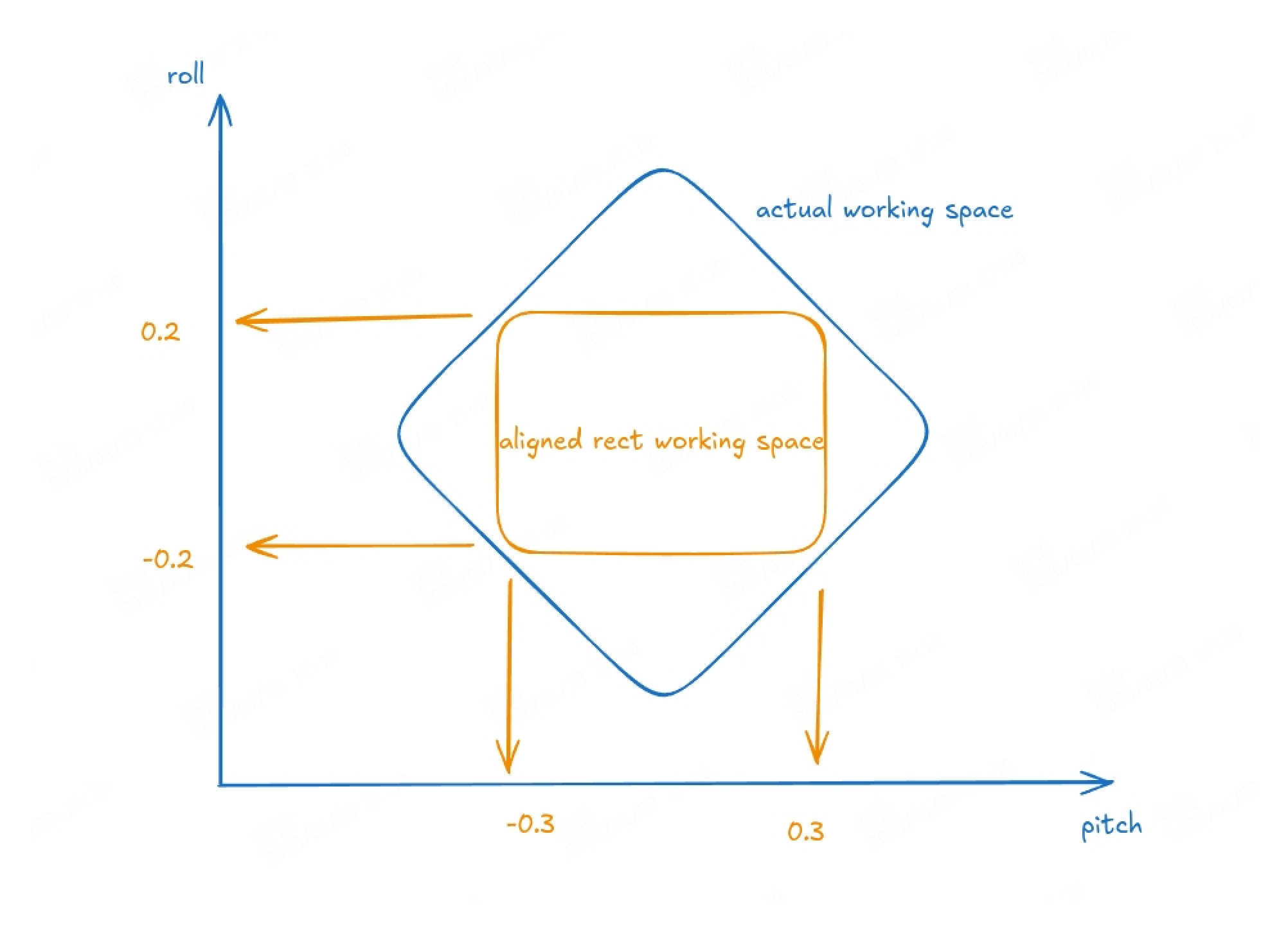
Note: The 6th and 7th joints of the dual-arm are connected via a parallel mechanism to control the wrist. Due to the geometric constraints of the parallel mechanism, the reachable workspace, when the translational degrees of freedom of the push rod are mapped to the pitch/roll serial degrees of freedom, does not form a rectangular area but rather a rhombus-like region, as illustrated by the blue area in the figure below:
For optimal tracking performance, the yellow region in the diagram is recommended. The corresponding joint limits for joints 6 and 7 are -0.3, 0.3 and -0.2, 0.2, respectively.
Below are the overall joint limit ranges for all joints of the dual-arm system after applying the aforementioned limits for the yellow region:
group indicates the arm to be moved, McPlanningGroup_LEFT_ARM for the left arm, and McPlanningGroup_RIGHT_ARM for the right arm
target indicates the target point for the arm to move to,
position represents the target position
orientation represents the target quaternion
joints represent the joint angles to be passed in, sequentially from J1 to J7
reference's joint_position represents the reference joint angles, generally set to 0. If not all are 0 and the length is consistent with the number of robot arm joints, i.e., 7 reference values, the robot will try to reach the target point as close as possible to these joint angles
Since this interface is asynchronous, it cannot directly return whether the task call is completed. You only need to save the task_id and then call the GetTaskState interface to query if the call is completed
This interface has Action restrictions and can only be called in the following Actions:
PASSIVE_UPPER_BODY_PLANNING_MOVE
PASSIVE_UPPER_BODY_ONLINE_PLANNING
RL_LOCOMOTION_ARM_EXT_PLANNING_MOVE
RL_WHOLE_BODY_EXT_ONLINE_PLANNING
In ONLINE_PLANNING mode, the current executing target can be interrupted to execute the next target directly. In this mode, the task execution status cannot be queried because the execution judgment is handed over to a higher level.
In ONLINE_PLANNING mode, the difference between the command and the current position should not be too large. For example, moving the hand from in front of the body to behind the body may result in a failed plan, leaving the hand in an odd position.
The SE3 target point is represented in the base coordinate system of the robot, indicating the position and orientation of the robot's palm. There is a certain offset relative to the end link in the URDF to make the end link poses of the left and right arms consistent, facilitating calculations.
The left arm target point is offset by [-0.1, 0.0, 0.0] relative to left_arm_link07, and the quaternion orientation is offset by [0.0, 0.0, 0.70710678, 0.70710678]
The right arm target point is offset by [0.1, 0.0, 0.0] relative to right_arm_link07, and the quaternion orientation is offset by [-0.70710678, 0.70710678, 0.0, 1.0]
To calculate the palm's pose, you can first subscribe to the ROS 2 TF topic, and then compute the palm's position. For a calculation example, please refer to example/mc/se3_location.py