
9. Interactive Secondary Development Guide
9. Interaction Secondary Development Guide
Interaction-related secondary development on the device side provides two types of development modes:
- Agibot Interaction Simple Extension
- Agibot interaction capabilities are retained, with Agibot providing basic interfaces such as TTS and motion expressions. These interfaces can be used to control the robot for basic exhibition hall tours, explanations, etc., while the robot can still use the Agibot voice interaction solution.
- Full Takeover by Secondary Development
- Agibot interaction capabilities are disabled, and Agibot provides noise-reduced microphone input from the robot, along with speaker usage permissions and face recognition results. The secondary development program fully takes over the voice interaction content.
The following is a detailed comparison table for both modes:
| Mode | Agibot Interaction Capabilities Retained | Interfaces Provided by Agibot Side | Network Requirements | Applicable Scenarios | Development Difficulty and Workload |
|---|---|---|---|---|---|
| Agibot Interaction Simple Extension | Yes | TTS, motion, expression, and face recognition interfaces | Both Agibot interaction solution and TTS interface require internet connection | Developing simple exhibition hall tour demos, fixed process arrangements | Relatively simple, workload depends on the complexity of the process, generally small |
| Full Takeover by Secondary Development | No | Noise-reduced audio, speaker, and face recognition interfaces | Internet connection required during robot initialization, not needed afterward | Independently developing a complete interaction solution | Higher difficulty, requires a full R&D team, larger workload |
9.1 Agibot Interaction Simple Extension
In this development mode, the available interfaces are as follows:
| Interface Name/Subscription Topic | Interface Description | Request Message Type | Response Message Type | Notes | Communication Backend |
|---|---|---|---|---|---|
TTSService.PlayTTS | Text-to-speech playback | PlayTTSRequest | PlayTTSResponse | Supports priority control and interruption strategy | http |
TTSService.PlayMediaFile | Play local audio file | PlayMediaFileRequest | PlayTTSResponse | Supports PCM/WAV format file playback | http |
TTSService.GetAudioStatus | Query TTS/audio file status | GetTTSStatusRequest | GetTTSStatusResponse | Get current playback status and queue information | http |
/interaction/tts_status | Query TTS/audio file status | TTSStatus | - | Get current playback status and queue information | ros2 |
TTSService.StopTTSTraceId | Stop TTS/audio file playback with specified id | StopTTSTraceIdRequest | CommonResponse | Only terminates the broadcast task with the specified trace_id | http |
TTSService.StopTTS | Stop all TTS/audio file playback | CommonRequest | CommonResponse | Terminates the current broadcast and all tasks in the queue | http |
HalAudioService.GetAudioVolume | Get volume level | CommonRequest | VolumeResponse | Get current volume level | http |
HalAudioService.SetAudioVolume | Set volume level | VolumeRequest | AudioCommonResponse | Adjust current volume level | http |
MotionCommandService.SendMotionCommand | Play specified motion file | MotionCommandRequest | CommonResponse | Can only be called under JOINT_SERVO suffix motion control Action | http |
MotionCommandService.GetMotionStatus | Query motion playback status | CommonRequest | MotionCommandResponse | Get current motion playback status | http |
ResourceService.GetMotion | Get motion list | GetMotionReq | GetMotionResp | Path can find corresponding files on x86 | http |
RcMotionPlayerService.PlayerMotion | Play motion with specified id | RcPlayerMotionRequest | CommonResponse | Can only be called under JOINT_SERVO suffix motion control Action | http |
ResourceService.GetEmoticon | Get emoticon list | GetEmoticonReq | GetEmoticonResp | Path can find corresponding files on x86 | http |
RcEmoticonPlayerService.PlayerEmoticon | Play emoticon with specified id | RcPlayerEmoticonRequest | RcPlayerEmoticonResponse | Only plays the specified motion_id emoticon | http |
/agent/vision/face_id | Face recognition result | FaceIdResult | - | Requires source environment to use | ros2 |
For detailed information on interaction-related interfaces, refer to the documentation for motion playback, emoticon playback, TTS/audio playback, and microphone management. Example files for interaction-related interfaces are provided in the AimDK package under the directories examples/rc, examples/motion_player, examples/agent, and examples/hal_audio.
9.2 Complete Takeover of Secondary Development
The modules involved in the Agibot interaction chain are two, namely agent and hal_audio, which can be simply understood as the agent module managing the microphone part, and the hal_audio module managing the speaker part. The agent module collects audio and performs speech recognition, then interacts with the cloud model, and after obtaining the result, sends it to the hal_audio module, which then performs corresponding voice playback, actions, expressions, etc., based on the result.
9.2.1 Exit the Agibot Interaction Chain
In this mode, it is necessary to have the Agibot interaction program exit the interaction chain, output only the noise-reduced microphone audio, face recognition results, and relinquish control of the speaker. Two operations need to be performed:
- Adjust the agent module to only_voice / voice_face mode, using the
SetAgentPropertiesRequestinterface in the microphone management section.
- only_voice: Outputs only the noise-reduced microphone audio /agent/process_audio_output, and all subsequent chains are disconnected.
- voice_face: Outputs the noise-reduced microphone audio /agent/process_audio_output and face recognition results /agent/vision/face_id, and all subsequent chains are disconnected.
For example, the rpc call required to adjust to only_voice mode is as follows:bashcurl -i \ -H 'content-type:application/json' \ -X POST 'http://192.168.100.110:59301/rpc/aimdk.protocol.AgentControlService/SetAgentPropertiesRequest' \ -d '{ "contents": { "properties": { "2": "only_voice" } } }'
After the call, the robot needs to be restarted for the changes to take effect. You can wait until the second step's modifications are completed before restarting together. After the restart, you can use theGetAgentPropertiesRequestinterface in the microphone management section to query the current interaction mode and determine if the mode has been successfully modified. (If recovery is needed, change "only_voice / voice_face" in theSetAgentPropertiesRequestinterface to "normal" and restart the robot.)
- Modify the configuration to default not start the hal_audio module (modify once, no need to repeat)
First, back up the /agibot/software/v0/entry/bin/cfg/run_agibot.yaml file on ORIN.bashcp /agibot/software/v0/entry/bin/cfg/run_agibot.yaml /agibot/software/v0/entry/bin/cfg/run_agibot.yaml.backup
Then, in the run_agibot.yaml file, delete the hal_audio module from the default_apps, do not modify other parts. After the modification, restart the robot. (If recovery is needed, restore the above file and restart the robot.)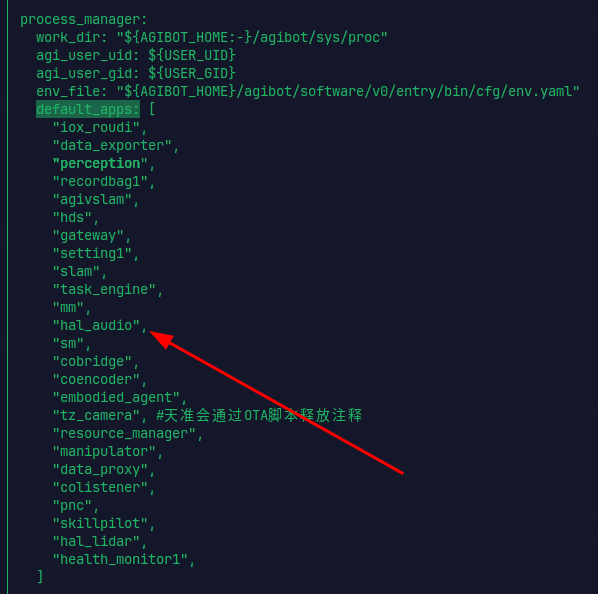
After the above operations, the Agibot interaction has exited the interaction chain.
9.2.2 Acquisition of Microphone Audio
Note: To obtain the following audio, the robot must be powered on and connected to the network for at least 2 minutes to complete audio-related authentication operations. Otherwise, there will be no raw audio output. For offline use, please ensure that this interface has audio output before disconnecting from the network.
After exiting the interaction chain, you can obtain the denoised microphone audio information of the body through the denoised microphone audio Topic interface /agent/process_audio_output. The sample program for obtaining the denoised microphone audio of the body is as follows:
#!/usr/bin/env python3

import rclpy
from rclpy.node import Node
from rclpy.qos import QoSHistoryPolicy, QoSProfile, QoSReliabilityPolicy
from ros2_plugin_proto.msg import RosMsgWrapper

from aimdk.protocol_pb2 import ProcessedAudioOutput, AudioVADState

import datetime
import os

class AudioSubscriber(Node):
    def __init__(self):
        super().__init__("audio_subscriber")

        # Audio buffer, stored separately by stream_id
        self.audio_buffers = {}  # {stream_id: bytearray()}
        self.recording_state = {}  # {stream_id: bool} Record whether recording is in progress

        # Create audio file storage directory
        self.audio_output_dir = "audio_recordings"
        os.makedirs(self.audio_output_dir, exist_ok=True)

        qos_profile = QoSProfile(
            history=QoSHistoryPolicy.KEEP_LAST,
            depth=10,
            reliability=QoSReliabilityPolicy.BEST_EFFORT,
        )

        self.subscription = self.create_subscription(
            RosMsgWrapper,
            "/agent/process_audio_output/pb_3Aaimdk_2Eprotocol_2EProcessedAudioOutput",
            self.audio_callback,
            qos_profile,
        )

        self.get_logger().info("Start subscribing to denoised audio data...")

    def audio_callback(self, msg):
        try:
            # Check if the serialization type is pb
            if msg.serialization_type != "pb":
                self.get_logger().warn(f"Unsupported serialization type: {msg.serialization_type}")
                return

            # Convert the data field from list[bytes] to bytes
            audio_data_bytes = b"".join(msg.data)

            # Use the generated protobuf class to parse the message
            processed_audio = ProcessedAudioOutput()
            processed_audio.ParseFromString(audio_data_bytes)

            self.get_logger().info(
                f"Received audio data: stream_id={processed_audio.stream_id}, "
                f"vad_state={processed_audio.vad_state}, "
                f"audio_size={len(processed_audio.audio_data)} bytes"
            )

            # Process audio based on VAD state
            self.handle_vad_state(processed_audio)

        except Exception as e:
            self.get_logger().error(f"Error processing audio message: {e}")

    def handle_vad_state(self, processed_audio):
        """Process different VAD states"""
        vad_state = processed_audio.vad_state
        stream_id = processed_audio.stream_id
        audio_data = processed_audio.audio_data

        # Initialize the buffer for this stream_id (if it does not exist)
        if stream_id not in self.audio_buffers:
            self.audio_buffers[stream_id] = bytearray()
            self.recording_state[stream_id] = False

        # VAD state name mapping
        vad_state_names = {
            AudioVADState.AUDIO_VAD_STATE_NONE: "No Speech",
            AudioVADState.AUDIO_VAD_STATE_BEGIN: "Speech Begin",
            AudioVADState.AUDIO_VAD_STATE_PROCESSING: "Speech Processing",
            AudioVADState.AUDIO_VAD_STATE_END: "Speech End",
        }

        stream_names = {1: "Built-in Microphone", 2: "External Microphone"}

        self.get_logger().info(
            f"[{stream_names.get(stream_id, f'Unknown Stream {stream_id}')}] "
            f"VAD State: {vad_state_names.get(vad_state, f'Unknown State {vad_state}')} "
            f"Audio Data: {len(audio_data)} bytes"
        )

        # Process audio data based on VAD state
        if vad_state == AudioVADState.AUDIO_VAD_STATE_BEGIN:
            self.get_logger().info("🎤 Speech detected, starting")
            # Start a new recording, clear the buffer
            self.audio_buffers[stream_id].clear()
            self.recording_state[stream_id] = True
            # Add current audio data
            if len(audio_data) > 0:
                self.audio_buffers[stream_id].extend(audio_data)

        elif vad_state == AudioVADState.AUDIO_VAD_STATE_PROCESSING:
            self.get_logger().info("🔄 Speech processing...")
            # If recording, continue adding audio data to the buffer
            if self.recording_state[stream_id] and len(audio_data) > 0:
                self.audio_buffers[stream_id].extend(audio_data)

        elif vad_state == AudioVADState.AUDIO_VAD_STATE_END:
            self.get_logger().info("✅ Speech ended")
            # Add the final audio data
            if self.recording_state[stream_id] and len(audio_data) > 0:
                self.audio_buffers[stream_id].extend(audio_data)

            # Save the complete audio segment
            if (
                self.recording_state[stream_id]
                and len(self.audio_buffers[stream_id]) > 0
            ):
                self.save_audio_segment(bytes(self.audio_buffers[stream_id]), stream_id)

            # End recording
            self.recording_state[stream_id] = False

        elif vad_state == AudioVADState.AUDIO_VAD_STATE_NONE:
            # No speech state, do not record
            if self.recording_state[stream_id]:
                self.get_logger().info("⏹️ Recording state reset")
                self.recording_state[stream_id] = False

        # Output current buffer status
        if stream_id in self.audio_buffers:
            buffer_size = len(self.audio_buffers[stream_id])
            recording = self.recording_state[stream_id]
            self.get_logger().debug(
                f"[Stream {stream_id}] Buffer size: {buffer_size} bytes, Recording status: {recording}"
            )

    def save_audio_segment(self, audio_data, stream_id):
        """Save audio segment 16kHz, 16-bit, mono PCM"""
        if len(audio_data) > 0:
            timestamp = datetime.datetime.now().strftime("%Y%m%d_%H%M%S_%f")

            # Create subdirectory by stream_id
            stream_dir = os.path.join(self.audio_output_dir, f"stream_{stream_id}")
            os.makedirs(stream_dir, exist_ok=True)

            # Generate filename
            stream_names = {1: "internal_mic", 2: "external_mic"}
            stream_name = stream_names.get(stream_id, f"stream_{stream_id}")
            filename = f"{stream_name}_{timestamp}.pcm"
            filepath = os.path.join(stream_dir, filename)

            try:
                with open(filepath, "wb") as f:
                    f.write(audio_data)
                self.get_logger().info(
                    f"Audio segment saved: {filepath} (Size: {len(audio_data)} bytes)"
                )

                # Calculate audio duration (assuming 16kHz, 16-bit, mono)
                sample_rate = 16000
                bits_per_sample = 16
                channels = 1
                bytes_per_sample = bits_per_sample // 8
                total_samples = len(audio_data) // (bytes_per_sample * channels)
                duration_seconds = total_samples / sample_rate

                self.get_logger().info(
                    f"Audio duration: {duration_seconds:.2f} seconds ({total_samples} samples)"
                )

            except Exception as e:
                self.get_logger().error(f"Failed to save audio file: {e}")

    def get_buffer_info(self):
        """Get information about all buffers (for debugging)"""
        info = {}
        for stream_id in self.audio_buffers:
            info[stream_id] = {
                "buffer_size": len(self.audio_buffers[stream_id]),
                "recording": self.recording_state[stream_id],
            }
        return info

def main(args=None):
    rclpy.init(args=args)

    audio_subscriber = AudioSubscriber()

    try:
        audio_subscriber.get_logger().info("Listening for denoised audio data, press Ctrl+C to exit...")
        rclpy.spin(audio_subscriber)
    except KeyboardInterrupt:
        audio_subscriber.get_logger().info("Exit signal received, shutting down...")
    finally:
        audio_subscriber.destroy_node()
        rclpy.shutdown()

if __name__ == "__main__":
    main()
The above program depends on the Python protocol package a2_aimdk and the ROS2 protocol package ros2_plugin_proto. The corresponding packages have been placed in the prebuilt directory of the AimDK development kit. Install the Python package using pip install prebuilt/a2_aimdk-1.0.0-py3-none-any.whl, and source the ROS2 package using source prebuilt/ros2_plugin_proto_aarch64/share/ros2_plugin_proto/local_setup.bash.
Please note that the above program receives ROS2 messages and requires the following environment variables to be set:
source /opt/ros/humble/setup.bash
export ROS_DOMAIN_ID=232
export ROS_LOCALHOST_ONLY=0
export FASTRTPS_DEFAULT_PROFILES_FILE=/agibot/software/v0/entry/bin/cfg/ros_dds_configuration.xml
The audio data is 16kHz sample rate, 16-bit mono PCM data (little-endian). The output audio is clean human voice that has undergone denoising, echo cancellation, etc., and can be directly used for ASR recognition.
The ProcessedAudioOutput message contains the following fields:
| Field Name | Type | Description |
|---|---|---|
| header | Header | General message header containing timestamp and message ID |
| stream_id | uint32 | Audio stream ID (1: built-in microphone, 2: external microphone) |
| vad_state | AudioVADState | Voice Activity Detection (VAD) state |
| audio_data | bytes | Denoised PCM audio data |
The AudioVADState enumeration is defined as:
| Enum Value | Value | Description |
|---|---|---|
| AUDIO_VAD_STATE_NONE | 0 | No Speech |
| AUDIO_VAD_STATE_BEGIN | 1 | Speech Begin |
| AUDIO_VAD_STATE_PROCESSING | 2 | Speech Processing |
| AUDIO_VAD_STATE_END | 3 | Speech End |
Note: In the current version, there is an issue with the vad_state output by the external microphone interface. The expected state sequence for a single voice input is 122222222223, whereas the actual output is 0111111111112. This issue occurs exclusively with the external microphone (the built-in microphone functions normally) and is scheduled to be fixed in a subsequent release. For the current version, it is recommended to manually apply a +1 offset compensation to the state values.
9.2.3 Speaker audio playback
Note: The robot's speaker volume setting must not exceed 70%. Exceeding this range will cause the speaker to operate beyond its rated capacity after being amplified by the amplifier, resulting in damage to the speaker.
You can use the following devices for playback. Please implement the program calls yourself. Audio channels, logical devices, and other configurations can be found in the /etc/asound.conf file on ORIN. For detailed instructions on audio playback, please refer to the next section.
aplay -D multiplay_def -c 1 -r 24000 -f S16_LE /agibot/data/var/interaction/audio/wake.pcm
Here are the volume control instructions:
- P1 Machine
- Set playback volume
amixer cset name='x Headphone Volume' 15(0~31)
- Get playback volume
amixer cget name='x Headphone Volume'
- Set mute
amixer sset 'x Headphone Left' off
amixer sset 'x Headphone Right' off
- Unmute
amixer sset 'x Headphone Left' on
amixer sset 'x Headphone Right' on
- T3 Machine
- Set playback volume
amixer -c DefPDevice sset Speaker 80%(0~100%)
- Get playback volume
amixer -c DefPDevice sget Speaker
- Set mute
amixer -c DefPDevice set Speaker off
- Unmute
amixer -c DefPDevice set Speaker on
9.2.4 Face Recognition
Notice:If the release operation for the interactive camera in "7.4.4 Camera Device Release" is executed before obtaining the face recognition result, the camera data stream will be interrupted, causing the face recognition to be unable to obtain image data, thus affecting the normal use of the function.
If the agent is set to voice_face mode, in addition to the denoised microphone audio Topic interface, it will simultaneously return the face recognition result Topic interface /agent/vision/face_id. This message is not available in only_voice mode.
The sample program for obtaining face recognition results is as follows:
#!/usr/bin/env python3

import rclpy
from rclpy.node import Node
from rclpy.qos import QoSHistoryPolicy, QoSProfile, QoSReliabilityPolicy
from ros2_plugin_proto.msg import RosMsgWrapper

from aimdk.protocol_pb2 import FaceIdResult


class FaceIdSubscriber(Node):
    def __init__(self):
        super().__init__("face_id_subscriber")

        qos_profile = QoSProfile(
            history=QoSHistoryPolicy.KEEP_LAST,
            depth=10,
            reliability=QoSReliabilityPolicy.BEST_EFFORT,
        )

        self.subscription = self.create_subscription(
            RosMsgWrapper,
            "/agent/vision/face_id/pb_3Aaimdk_2Eprotocol_2EFaceIdResult",
            self.face_id_callback,
            qos_profile,
        )

        self.get_logger().info("已开始订阅 FaceID 数据...")

    def face_id_callback(self, msg):
        try:
            if msg.serialization_type != "pb":
                self.get_logger().warn(
                    f"收到不支持的序列化类型: {msg.serialization_type}"
                )
                return

            # Concatenate bytes
            raw_bytes = b"".join(msg.data)

            # Parse protobuf
            face_id_result = FaceIdResult()
            face_id_result.ParseFromString(raw_bytes)

            # log output
            import json
            from google.protobuf.json_format import MessageToDict
            self.get_logger().info(
                f"FaceID 结果: {json.dumps(MessageToDict(face_id_result, preserving_proto_field_name=True), ensure_ascii=False, indent=2)}")

        except Exception as e:
            self.get_logger().error(f"解析 FaceID 数据时出现错误: {e}")


def main(args=None):
    rclpy.init(args=args)
    node = FaceIdSubscriber()

    try:
        node.get_logger().info("正在监听 FaceID 数据,按 Ctrl+C 退出...")
        rclpy.spin(node)
    except KeyboardInterrupt:
        node.get_logger().info("退出中...")
    finally:
        node.destroy_node()
        rclpy.shutdown()


if __name__ == "__main__":
    main()
The above program depends on the Python protocol package a2_aimdk and the ROS2 protocol package ros2_plugin_proto. The corresponding packages have been placed in the prebuilt directory of the AimDK development kit. Install the Python package using pip install prebuilt/a2_aimdk-1.0.0-py3-none-any.whl, and source the ROS2 package using source prebuilt/ros2_plugin_proto_aarch64/share/ros2_plugin_proto/local_setup.bash.
Please note that the above program receives ROS2 messages and requires the following environment variables to be set:
source /opt/ros/humble/setup.bash
export ROS_DOMAIN_ID=232
export ROS_LOCALHOST_ONLY=0
export FASTRTPS_DEFAULT_PROFILES_FILE=/agibot/software/v0/entry/bin/cfg/ros_dds_configuration.xml
A local face registration interface is also provided. This interface is neither a conventional HTTP JSON RPC nor a ROS2 Topic; instead, a dedicated invocation script is provided: examples/agent/run_face_id_register.sh. The content is as follows:
#!/bin/bash

# 1. Directory containing images to be registered (same level as the sh script)
RUN_SCRIPT_DIR="$(cd "$(dirname "${BASH_SOURCE[0]}")" && pwd)"
IMAGES_DIR="${RUN_SCRIPT_DIR}/images"

# 2. Faceid base directory
FACEID_SCRIPT_DIR="/agibot/software/v0/scripts/agent/face_id/"
FACEID_LIB_DIR="/agibot/software/v0/bin"
FACEID_OFFLINE_FEAT="/agibot/data/param/interaction/face_id/offline_face_features"

# 3. Relative paths of the executable file and configuration file
EXEC="${FACEID_SCRIPT_DIR}/face_id_register"
CONF="${FACEID_SCRIPT_DIR}/face_id_config.json"

chmod +x "$EXEC"
export LD_LIBRARY_PATH="${FACEID_LIB_DIR}":$LD_LIBRARY_PATH

# 4. Call
rm -rf "$FACEID_OFFLINE_FEAT"/*
"$EXEC" "$CONF" "$IMAGES_DIR"
Place the facial data to be registered into the images directory located in the same folder as the script. Execute this script on the ORIN to complete the registration. After registration, the correspondence between IDs and images, along with the registration success status, will be stored in the Result.txt file in the same directory. See the example below (note that registration was successful even for blurred images and images where the face was too small; however, for actual usage, it is still recommended to use clear, frontal facial images as shown in the satisfied.png to avoid negative impacts on the recognition rate):
GID17648293009168001    满足.png          OK    注册成功
GID17648293018063607    侧脸.png          FAIL  人脸质量不满足要求
GID17648293020281011    过暗.png          FAIL  人脸质量不满足要求
GID17648293021878934    模糊.png          OK    注册成功
GID17648293024764703    过曝.png          FAIL  人脸质量不满足要求
GID17648293026684491    无人脸.png       FAIL  未检测到人脸
GID17648293028768487    非人脸.png       FAIL  未检测到人脸
GID17648293030305970    人脸过小.png    OK    注册成功
Face Registration and Recognition Logic Rules:
- Place facial images in the images directory. The images must be in JPG, PNG, or JPEG format and contain only one clear, frontal face. Run the script to register them. After registration, restart the agent by executing
aima em stop-app agent && aima em start-app agenton the ORIN, or simply reboot the robot. - The registered facial features will be stored locally on the ORIN at the following path: /agibot/data/param/interaction/face_id/offline_face_features.
- The construction rule for the registered User ID (UID) is: "GID" + Timestamp + 4-digit random number. Upon publishing, the current machine's Serial Number (SN) from /agibot/data/info/sn will replace "GID" to form the new UID.
- Faces can also be uploaded via the Lingxin platform, which we refer to as the Cloud Face Database. This database allows configuration of greetings, etc. The corresponding content is downloaded and stored in the user_info.json file on the ORIN at the following path: /agibot/data/param/interaction/face_id/user_info.json.
- Important: Each execution of the aforementioned script will clear the existing local database. Therefore, you must re-register all facial data completely every time. Maintain a single images folder containing all faces that need to be recognized, and rerun the registration script whenever there are any additions, deletions, or modifications.
- The matching rule always prioritizes the Cloud Face Database first, followed by the local database. Once the first successful match is found, the system will stop searching the remaining faces.
9.2.5 Wake-Up Result Reporting
If agent is set to only_voice mode, the wake-up result reporting topic is /agent/wakeup/pb_3Aaimdk_2Eprotocol_2EWakeUpResult.
Example program for receiving wake-up result reports:
#!/usr/bin/env python3

import rclpy
from rclpy.node import Node
from rclpy.qos import (
    QoSDurabilityPolicy,
    QoSHistoryPolicy,
    QoSProfile,
    QoSReliabilityPolicy,
)
from ros2_plugin_proto.msg import RosMsgWrapper

from aimdk.protocol_pb2 import WakeUpResult


TOPIC = "/agent/wakeup/pb_3Aaimdk_2Eprotocol_2EWakeUpResult"


class WakeUpSubscriber(Node):
    def __init__(self):
        super().__init__("wakeup_result_subscriber")

        qos_profile = QoSProfile(
            history=QoSHistoryPolicy.KEEP_LAST,
            depth=10,
            reliability=QoSReliabilityPolicy.RELIABLE,
            durability=QoSDurabilityPolicy.VOLATILE,
        )

        self.subscription = self.create_subscription(
            RosMsgWrapper,
            TOPIC,
            self.wakeup_callback,
            qos_profile,
        )

        self.get_logger().info(f"已开始订阅 WakeUpResult: {TOPIC}")

    def wakeup_callback(self, msg):
        try:
            if msg.serialization_type != "pb":
                self.get_logger().warn(
                    f"收到不支持的序列化类型: {msg.serialization_type}"
                )
                return

            # Join bytes
            raw_bytes = b"".join(msg.data)

            # Parse protobuf
            wakeup_result = WakeUpResult()
            wakeup_result.ParseFromString(raw_bytes)

            # Log output
            import json
            from google.protobuf.json_format import MessageToDict

            self.get_logger().info(
                f"WakeUpResult: {json.dumps(MessageToDict(wakeup_result, preserving_proto_field_name=True), ensure_ascii=False, indent=2)}"
            )

        except Exception as e:
            self.get_logger().error(f"解析 WakeUpResult 数据时出现错误: {e}")


def main(args=None):
    rclpy.init(args=args)
    node = WakeUpSubscriber()

    try:
        node.get_logger().info("正在监听 WakeUpResult,按 Ctrl+C 退出...")
        rclpy.spin(node)
    except KeyboardInterrupt:
        node.get_logger().info("退出中...")
    finally:
        node.destroy_node()
        rclpy.shutdown()


if __name__ == "__main__":
    main()
The above program depends on the Python protocol package a2_aimdk and the ROS2 protocol package ros2_plugin_proto. Both packages are already included in the prebuilt directory of the AimDK development package. Install the Python package with pip install prebuilt/a2_aimdk-2.0.1-py3-none-any.whl, and source the ROS2 package with source prebuilt/ros2_plugin_proto_aarch64/share/ros2_plugin_proto/local_setup.bash.
Please note that the above program receives ROS2 messages and requires the following environment variables:
source /opt/ros/humble/setup.bash
export ROS_DOMAIN_ID=232
export ROS_LOCALHOST_ONLY=0
export FASTRTPS_DEFAULT_PROFILES_FILE=/agibot/software/v0/entry/bin/cfg/ros_dds_configuration.xml